





Sales AI notetaker integration guide: connecting to Salesforce, HubSpot, and your CRM.
February 22
Granola's workflow puts your own review between the transcript and your system of record, so only the details you confirm are worth keeping end up in your CRM.
The gap between a meeting ending and an accurate CRM record appearing is where deals slip, context collapses, and follow-up falls through the cracks. Without a structured capture-and-verify process, your pipeline data accumulates noise that nobody trusts. AI notetakers promise to close this gap, but the integration strategy matters as much as the tool itself.
Most integrations fail not because transcription doesn't work, but because they auto-dump unverified summaries directly into CRM records. The right approach is AI capture, human verification, and then a deliberate sync. This guide walks through how to connect your AI notepad to Salesforce, HubSpot, and your broader CRM and sales stack while keeping your data clean and your conversations confidential.
The problem with "set it and forget it" CRM integrations
When automation pollutes your data
Fully automated sync appeals because the meeting ends, a summary appears in Salesforce, and you never touch a keyboard. The problem is that raw AI summaries are rarely structured the way your CRM expects. When tools push unedited transcripts or generic summaries into deal records, they create fields filled with noise, missed context, and occasionally inaccurate details.
The principle is simple: garbage in, garbage out. You can't use a Salesforce opportunity record that contains a 2,000-word transcript instead of a clean "next steps" field and a verified budget figure. It's clutter your team will stop reading and eventually ignore.
Granola's product documentation on AI-enhanced notes describes the alternative clearly: "You start with your judgment about what matters. You jot 'Pricing concerns' during the conversation. When the meeting ends, you click 'Enhance notes,' and Granola finds every pricing discussion in the transcript and adds relevant quotes." You've verified the note before it goes anywhere near your CRM.
Core integration workflows: how to connect your sales stack
Connecting to Salesforce
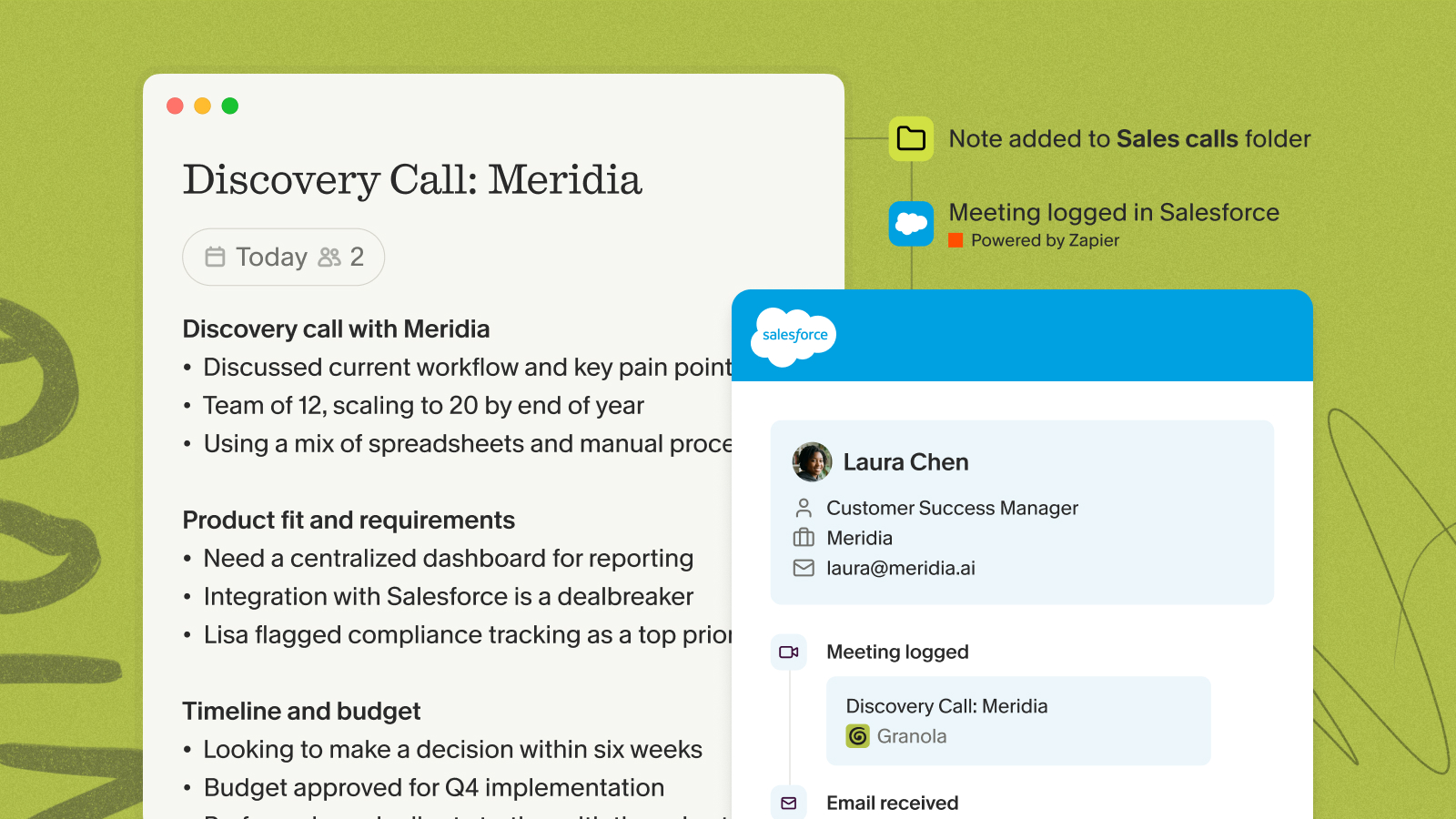
Granola does not offer a native Salesforce connector as of early 2026. The supported path runs through Zapier, which routes enhanced notes into Salesforce objects like Opportunities, Contacts, and Tasks. Granola also connects through Zapier to Notion, Google Docs, Airtable, Google Sheets, and Asana.
If you have searched for an AI notetaker with Salesforce integration, this is the workflow to know: capture in Granola, review, then push the verified note to Salesforce through Zapier. The practical Salesforce workflow:
- Run the meeting. Jot rough bullets in Granola during the conversation, flagging key moments like pricing objections or next steps.
- Click "Enhance notes." Granola's AI fills in your bullets with relevant quotes and context from the transcript.
- Review and edit. Read the enhanced note, correct any inaccuracies, and delete anything that isn't relevant to the record.
- Trigger the Zap. The configured Zapier workflow pushes the verified note into the correct Salesforce fields.
- Verify in Salesforce. Confirm the data landed in the right object before closing.
This verification step is what separates a clean CRM from a cluttered one.
Connecting to HubSpot
HubSpot has a native integration in Granola accessible directly through Settings. For the full HubSpot walkthrough, including automatic folder triggering, see Granola's dedicated HubSpot integration guide. The setup works with the work account connected to Granola, whether that's Google Workspace or Microsoft 365.365.
Setup steps:
- Open Settings: Navigate via your avatar in the bottom left.
- Select Integrations: Click HubSpot.
- Complete OAuth: Connect in the browser window that opens.
- Sync after meetings: Open the note and click the HubSpot option in the top right.
- Choose contact: Select the HubSpot contact to associate with the note. Granola adds the note to that contact's record.
One important detail: the sync is manual per note, not automatic. You choose which notes go to HubSpot and when, which keeps the human-in-the-loop workflow intact rather than pushing every meeting into the CRM automatically.
If the integration stops working, the HubSpot help documentation recommends disconnecting and reconnecting through Settings > HubSpot, and confirming your Granola and HubSpot accounts share the same email address.
Using MCP for custom workflows
Granola's MCP integration connects your meeting notes to AI tools like Claude and ChatGPT using the Model Context Protocol, an open standard that lets AI applications query external data sources on your behalf. Think of it as a secure bridge between your private meeting history and any MCP-compatible AI tool.
With MCP enabled on a Business plan, you can ask Claude questions like "Using my Granola notes from the last two weeks, draft an account summary for the Acme Corp renewal highlighting their stated priorities, objections raised, and agreed next steps" and get a response that pulls directly from your actual transcripts rather than generic context.
Granola's integrations overview describes the capability: "Connect Granola to AI assistants like Claude and ChatGPT using MCP. Query your meeting notes, search by date range, and get detailed transcripts directly in your favorite AI tools."
Confidential enterprise account documentation workflows
Turning a 60-to-90-minute discovery or negotiation call into a structured deal brief without losing nuance is where integration strategy matters most. Exact pricing sensitivities, executive priorities, competitive objections, and buying committee dynamics are easy to lose in the gap between a live conversation and a written summary.
The friction point most enterprise sales reps describe is the same: back-to-back calls leave no time to write up detailed notes before context fades, so the specifics of a negotiation are gone by the time anyone sits down to record them.
The practical workflow for CRM population:
- Conduct the call with Granola running on your laptop, using your device's audio to generate notes.
- Jot abbreviated bullets during the call, flagging specific objections, pricing signals, and stakeholder commitments.
- Click "Enhance notes" after the call to generate a structured deal brief with captured quotes.
- Review the enhanced note against your recollection and correct any misattributions before anything enters the CRM.
- Copy the verified summary into your CRM deal record in Salesforce or HubSpot, or sync it directly using the native HubSpot integration, or Zapier for Salesforce.
- Query specifics later using Granola's chat function: "What budget figure did the procurement lead mention on the March 12th call?"
Because the enhanced note lives in Granola until you explicitly push it, sensitive commercial details, pricing discussions, competitive intelligence, executive relationships, stay out of your CRM until a rep has reviewed and verified them. That review step is what keeps AI-generated summaries from creating compliance or accuracy problems in your account records.
Granola also connects natively to Notion for teams that organize deal research or account intelligence in Notion workspaces. For other repositories, copy-paste or Zapier workflows cover the gap.
"With Granola I don't have to worry anymore about taking meeting notes, I can just write down things I really care about and let Granola take care of the rest. Love that I can easily share my notes with my colleagues as well, and that we can all chat with the meeting transcript so everyone can see the full context of the meeting, even if they weren't there." - Jess M. on G2
Data privacy, consent, and compliance
Telling participants you're using Granola
You should tell participants you are using Granola to transcribe the call, and the practical framing is conversational rather than procedural, as Laura Kinder demonstrates: "Hey, I'm going to have Granola running in the background, do you mind?" With that said up front, you can stay in the conversation and let the write-up wait until afterwards.
Granola offers two built-in transparency features to keep participants informed: an automatic in-chat notification that posts when transcription starts, and a video watermark that shows Granola is active throughout the call. Granola accesses microphone audio and meeting audio on your device, transcribes it in real time, and the audio is not stored. Only the text transcript is retained.
SOC 2 and data residency
Granola achieved SOC 2 Type 2 certification in July 2025. Key data protections to verify before deploying any AI notetaker for confidential work:
- Audio handling: Granola transcribes in real time and does not store audio, retaining only text transcripts.
- Encryption: Meeting content is encrypted in transit and at rest.
- AI training prohibition: Third-party AI providers are contractually prohibited from training on your data.
- Model training opt-out: Enterprise plan customers receive organization-wide opt-out from AI model training by default. Users on other plans can disable this manually in Settings.
- GDPR compliance: Confirmed per Granola's security page.
If your compliance team requires a Data Processing Agreement, request it directly from Granola before rolling out on sensitive searches or confidential client work.
Choosing the right AI notetaker for your CRM
How the main tools compare
The most meaningful differences between AI notetakers are not transcription accuracy but integration architecture, platform support, and the level of human control over what enters your systems.
| Tool | Bot presence | Integration approach | Best for |
|---|---|---|---|
| Granola | Captures device audio | Manual-trigger HubSpot, Attio, Affinity natively; Zapier for Salesforce; MCP for AI tools | Confidential calls, strategic account management, high-touch client work |
| Gong | Bot joins as participant | Deep native CRM sync with Salesforce and HubSpot, editable fields sync back automatically | High-volume sales teams needing revenue analytics |
| Fathom | {"Visible \"Fathom Notetaker\" participant in call"} | CRM integration focused on sales workflow automation | Sales teams prioritizing automated CRM workflows |
The practical takeaway: if your priority is verified notes and native CRM sync to HubSpot, Attio, or Affinity, Granola fits. If you need Salesforce specifically, Granola routes through Zapier rather than a native connector, so factor that into your setup.
Pricing and integration costs
Granola's pricing structure gates all integrations behind paid tiers:
- Free plan: AI-enhanced notes and real-time transcription to test the core workflow before committing.
- Business plan ($14/user/month): Native CRM integrations (HubSpot, Attio, Affinity), Zapier for Salesforce and other tools, Granola MCP, Slack, and Notion.
- Enterprise plan ($35+/user/month): SOC 2 Type 2 certification, organization-wide AI training opt-out, SSO, admin controls, public API access, and priority support.
If you're running confidential deals or managing sensitive client conversations, evaluate the Enterprise plan's automatic model training opt-out and SOC 2 documentation against the Business plan before deploying at scale.
"The time saved in adding notes to CRM and removed from admin follow ups. the constant work on further embedding this software into the customer journey is amazing." - Rakeem L. on G2
Troubleshooting common integration issues
Most integration problems fall into four categories, each with a straightforward fix.
- Duplicate CRM entries: Search your CRM manually for the existing contact or deal before syncing, then associate the note directly to avoid creating a second record.
- HubSpot sync failures: Confirm your Granola and HubSpot accounts use the same email address, then disconnect and reconnect through Settings > HubSpot. This resolves the majority of cases per the troubleshooting documentation.
- Orphan notes not linked to a CRM record: Open the note, click the HubSpot share option in the top right, and manually select the correct contact before syncing.
- Salesforce Zap errors: Check the Zapier integration setup to confirm the trigger and action fields map correctly to your target Salesforce objects.
"Granola is the one tool I continuously have up during my day whether in a meeting or going back to 'ask questions' about what happened during the meeting. Integrations with other systems is still in its infancy. The team is listening to their users and building based on need." - Andy C. on G2
Building a workflow that works for you
You can now eliminate the gap between what gets said in a meeting and what ends up in your CRM. But the gap persists when integrations run on autopilot, bypassing the judgment that makes meeting data worth storing.
The clean data approach, described in Granola's own design philosophy, builds on a simple principle: you write what matters, AI fills in the supporting detail, and you decide what syncs. That sequence protects data quality and keeps confidential conversations out of shared channels they were never meant for.
Download Granola for Mac, Windows, iPhone or Android, connect your calendar, and test the "Enhance > Sync" workflow on your next call. For sensitive deals or confidential client work, review the SOC 2 documentation and confirm your consent disclosure approach before rolling out more broadly.
Frequently asked questions
Does Granola automatically update Salesforce fields?
No. Granola routes to Salesforce via Zapier, not a native connector, so you configure which fields receive data through the Zap setup. The sync triggers manually after you review and approve the enhanced note.
Can AI push meeting notes directly into Salesforce?
Yes, through Zapier. Granola has no native Salesforce connector, so enhanced notes route into Salesforce Opportunities, Contacts, and Tasks through a Zap you configure once. The push triggers only after you review and approve the note, so unverified summaries never reach your records.
Which AI notetakers integrate with CRM?
Granola connects natively to HubSpot, Attio, and Affinity, and to Salesforce through Zapier. Gong and Fathom offer their own native CRM sync. The practical difference is control: Granola syncs each note manually after you review it, while fully automated tools push every meeting summary into the CRM without a verification step.
Can I use Granola across a sales team with shared accounts?
Yes. Each team member runs Granola individually, but you can standardize note templates and Zap configurations so every rep routes call summaries to the same CRM fields. For shared accounts with multiple stakeholders, reps can tag the relevant opportunity in Salesforce or HubSpot during the review step, keeping all deal touchpoints consolidated under one record regardless of who took the call.
Is my meeting data used to train AI models?
By default, Granola may use anonymized data for model improvement on Free and Business plans. Enterprise plan customers receive organization-wide opt-out automatically, and users on other plans can disable this manually in Settings. Third-party AI providers are contractually prohibited from training on your data regardless of plan tier.
How do I handle consent disclosure for confidential client or prospect calls?
Tell participants conversationally before the call starts: "I'm going to have Granola running in the background to help with notes, is that okay?" With that agreed, you can give the conversation your full attention and pick up the detail from your notes afterwards.
Does Granola work with Zoom, Teams, and Google Meet?
Yes. Granola runs on your laptop or phone and uses your device's audio to generate notes across Zoom, Google Meet, and Microsoft Teams. Setup requires granting microphone permissions during installation, and you should let participants know you're using Granola to transcribe the call.
What happens if notes fail to generate?
Check the notes not generating troubleshooting guide for steps to resolve audio permission issues and background processing conflicts.
Key terminology
AI notepad: Granola's positioning reflects its human-first design, where you jot rough notes and AI enhances them, rather than a fully automated system that generates notes without your input.
Device audio capture: Transcribing a meeting by accessing your device's microphone and meeting audio directly. Users should tell other participants they are using Granola to transcribe the call, using the in-chat notification or video watermark.
MCP (Model Context Protocol): An open standard that lets AI tools like Claude and ChatGPT connect to external data sources, including your Granola meeting notes, to generate contextually accurate outputs on request. Available on Business plans and above.
SOC 2 Type 2: An independent security certification that verifies a vendor maintained adequate data protection controls over an extended audit period.
Human-in-the-loop verification: The workflow step between AI enhancement and CRM sync where you review, edit, and approve note content before it enters your system of record. This step separates clean data from an automated data dump.
Data Processing Agreement (DPA): A contract between your organization and a data processor that governs how personal data is handled. Required for GDPR compliance when meeting transcripts contain identifiable information about third parties.