





Recall exactly what was said and when, across every meeting q
September 4
TL;DR: Memory fades faster than most product teams account for. Within days of a meeting, conversation details blur and critical customer interviews become vague impressions. Keyword search makes this worse: it fails whenever you can't remember the exact words a customer used. Granola solves this by combining your rough notes with AI-enhanced transcript context, letting you query across every past call with source-linked citations, so you can pull an exact customer quote from six months ago in seconds, not hours.
Back-to-back customer interviews create a documentation gap that compounds over time. Within days of a meeting, conversation details blur, which means the discovery calls you ran in Q1 are already fading by Q2 planning season. Whether the meeting was a customer interview, a sales discovery call, a hiring conversation, or a team planning session, the gap between what was said and what you can prove grows fast: it's a direct threat to the credibility of every decision you defend to stakeholders.
This guide shows how to build a searchable, structured archive of your meetings using an AI notepad, so you can retrieve exact quotes and context in seconds without scrubbing raw transcripts.
Locating exact customer quotes in seconds
Customer research tends to scatter across Notion pages, Google Docs, Zoom recordings, and personal notes. When a stakeholder asks "Where did you hear that?" in a prioritization meeting, you need the specific quote, which means knowing roughly when the conversation happened, locating the transcript, and searching through it manually.
The shift from keyword search to meaning-based AI querying changes this entirely. Instead of remembering the exact phrase a customer used, you describe what you remember and let the AI find the conceptual match across your entire meeting history.
Why manual transcript review fails
Scrolling through a long transcript to find one quote fails as a research workflow. Keyword search compounds the problem because it typically relies on exact term matching: if a customer said "cost concerns" and you search "pricing pressure," you may get nothing. Semantic search understands that these phrases mean the same thing, while keyword search often treats them as unrelated strings of text.
| Feature | Keyword search (Ctrl+F) | Meaning-based querying (Granola Chat) |
|---|---|---|
| Search method | Exact term match | Semantic understanding |
| Synonyms and related terms | Misses all | Finds automatically |
| Multi-meeting search | One file at a time | All meetings simultaneously |
| Context retrieval | None | Surrounding conversation with citation |
Granola Chat handles queries at the level of meaning. You ask "What did customers say about onboarding friction?" and the AI searches across your entire archive, finds every relevant conversation, and returns answers with source-linked citations linking directly to the original meeting.
Providing instant citations for claims
Three months after a discovery call, you need to defend a prioritization decision with specific evidence. Granola Chat doesn't just summarize what you found: it points to exactly where it was said, which meeting, which date, and links directly to the source.
Every response includes source-linked citations that link back to the source conversation. Click through and you land on the exact note segment, not the top of a 3,000-word document. This changes how you present research to stakeholders: instead of "I think I heard this a few months ago," you share a cited quote with the customer's name, company, and date attached.
Search meeting notes for precise customer insights
Turning meetings into a structured repository builds institutional memory that outlasts any individual contributor. When a PM leaves, their insights typically leave with them. When notes are queryable and shared across a team folder, the research practice survives.
Retrieve specific answers from old calls
Common scenario: SSO gets prioritized as a Q3 feature after multiple discovery calls mention it. Leadership challenges the decision in planning. You need exact quotes, customer names, and context, fast.
With Granola Chat, you type: "What did customers say about SSO needs in the last six months?" The query runs across your entire meeting archive or a specific folder, returns source-linked citations from each relevant conversation, and shows you which customers mentioned SSO, in what context, and when.
Granola Chat handles both quick recall and pattern analysis across months of calls, with source-linked citations you can share directly with stakeholders.
Verify claims with source recordings
Granola captures device audio directly from your Mac or Windows computer, transcribes in real time, and deletes the audio immediately. No audio file is stored anywhere. What persists is the structured transcript and your enhanced notes, which function as the verified source of truth for every conversation.
Granola is also available on both iPhone and Android. The mobile app lets you take AI-enhanced notes during in-person meetings and, on iOS, phone calls as well. For meetings recorded on mobile, Granola temporarily caches the audio during processing and then stores only the resulting transcript.
This architecture trades audio playback for a privacy guarantee that matters in sensitive research contexts. The full technical details are documented in Granola's Trust Center, including the SOC 2 Type 2 audit completed in 2025. For most product research, the transcript is sufficient.
Eliminate manual note tagging workflows
Many research repositories require extensive manual tagging before search becomes useful. You tag by theme, by participant, by company segment, and by feature area, often spending as much time organizing insights as you spent gathering them.
Granola's agentic chat finds patterns across your meeting history without requiring you to categorize first. Run a saved Recipe prompt like "Summarize top onboarding friction points across Q2 customer calls" against your entire Customer Research folder and get source-linked citations in seconds.
For teams already working with Claude, ChatGPT, or other AI tools, Granola supports Model Context Protocol (MCP), letting compatible applications query your meeting notes directly.
Example: proving a customer insight from six months ago
In a typical planning meeting, a senior stakeholder asks for evidence backing a Q3 feature priority. Without a queryable archive, that means searching Calendar for relevant meeting titles, downloading transcript files from Drive, opening each document, running keyword search, and compiling results by hand. A single research question can consume a significant chunk of your afternoon. With Granola, that same task takes minutes.
Backing your claims with past data
A searchable archive prevents the "he-said-she-said" dynamic that derails roadmap meetings. Showing the exact quote, the customer's name, the date, and the meeting context shifts the conversation from debate to decision.
Search meeting notes for exact quotes
The query that solves the SSO defense scenario in Granola Chat:
"What did customers say about needing SSO or single sign-on in the past six months? Include which company they work for and when the conversation happened."
Granola searches every note in your archive or specified folder, returns cited findings from each relevant meeting, and groups them by theme. You get the exact language customers used, attached to their name and date, ready to share.
Linking quotes to past meeting context
Each citation in Granola Chat links to the specific meeting date, company name, and folder where the conversation was captured. When you share this with leadership, they're not looking at bullet points from memory: they're looking at source-linked citations that trace directly back to the original customer conversations. People & Companies views in Granola organize all notes around the individuals and companies you meet with repeatedly, so you can show the full history of every conversation with a specific customer in one place.
Why structured notes outperform raw meeting transcripts
Raw transcripts are hard to read and nearly impossible to search by theme. A 45-minute discovery call produces thousands of words of unformatted speech, including filler words, repeated phrases, and tangents unrelated to your research questions. Granola's core approach is human-in-the-loop note enhancement: you jot what matters during the meeting, and the AI fills in the details afterward using transcript context.
Transform raw talk into structured insights
During a customer interview, write rough headings in the Granola notepad: "Pain points," "Current workaround," "SSO interest," "Timeline." Under each heading, jot a few short cues as the conversation moves. When the call ends, Granola uses your rough notes as a guide, pulls relevant quotes from the full transcript, and expands each section. Granola displays your original notes in black and marks AI additions in gray, so you always know what you wrote versus what the AI inferred. Write "SSO concerns" and Granola finds every moment in the transcript where the customer mentioned access management, authentication, or IT requirements.
Designed for deep customer insights
Pre-meeting briefs in Granola prepare you for each interview overnight, surfacing open threads and relevant context from previous conversations with the same customer. Walk into a discovery call already knowing what came up last time. After the interview, run a Recipe to extract feature requests, draft a follow-up email, or build an executive summary directly from the enhanced notes.
How to centralize your meeting archive
Setting up a research repository in Granola takes under five minutes and requires no tagging taxonomy, no manual categorization, and no team training.
Categorize research by project folders
Create shared folders for each active research initiative: "Customer Discovery Q3," "Competitive Landscape Interviews," "Onboarding Friction Research." Any team member with access can open a folder and query across all meetings inside it, without needing to ask you which calls are relevant. Adding a new interview to the right folder takes one step after the meeting ends.
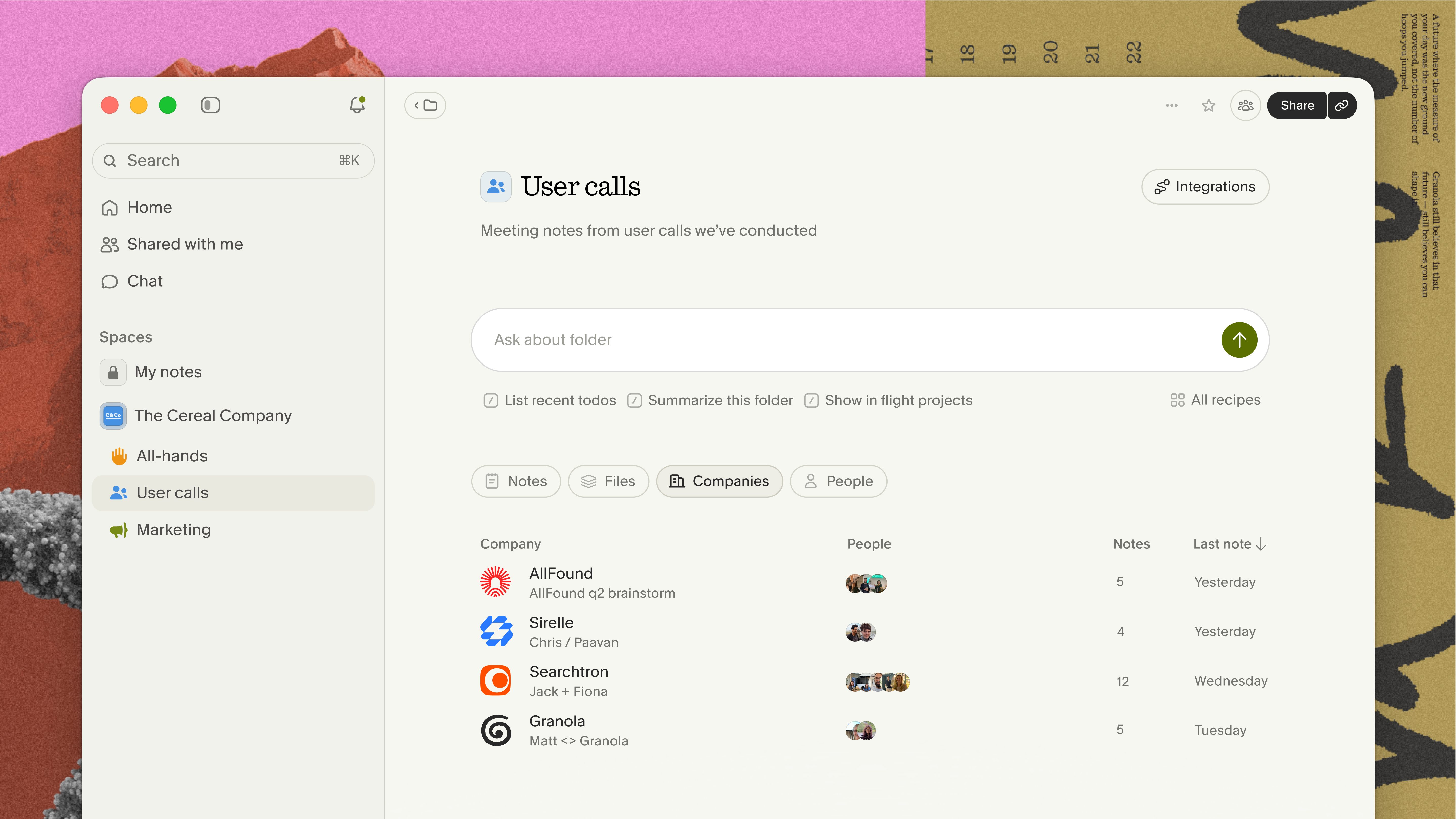
Locate specific feedback from past calls
Google Calendar's native search is the most common starting point for finding a past meeting, but it has a hard technical limitation: Calendar search only indexes event titles, descriptions, locations, and attendee names, not the content of what was said. To find a specific quote from any meeting using native Google tools, you need to work through these steps:
Checklist: Finding a past meeting quote using Google Calendar and Drive
- Open Google Calendar on the web and search by event title or attendee name.
- Click the matching event to see the linked transcript file in Drive.
- Open Google Drive and search for "transcript" combined with the meeting name or date.
- Open the transcript document and run Ctrl+F for a keyword you remember.
- If the exact term doesn't appear, open related transcript files and repeat.
- Compile any matching quotes manually into a separate document.
- Note the date and attendee list from the Calendar event for attribution.
This process works when you remember the date and exact phrasing. It fails when you remember the concept but not the words, when the transcript is buried in a Drive folder you can't locate, or when the meeting happened outside your storage window. A dedicated archive in Granola replaces this workflow entirely.
Turn interview takeaways into team action
Once a meeting is enhanced and organized into a folder, pushing insights to your existing tools is a single step. The Slack integration auto-posts summaries to relevant channels after meetings end. The HubSpot integration routes customer feedback directly to the relevant contact record. For custom workflows, Granola + Zapier connects to over 8,000 apps, including routing specific insights to Asana tasks or Google Sheets trackers.
Plans, platforms, and data protection
Accessing your entire meeting history
Plan access determines how far back your queries can reach.
| Plan | Monthly cost | Meeting history for search | Advanced integrations |
|---|---|---|---|
| Basic | $0/user | Limited history | Not included |
| Business | $14/user | Unlimited history | Slack, Notion, HubSpot, Attio, Affinity, Zapier |
| Enterprise | $35+/user | Unlimited + admin controls | All Business + SSO, org-wide settings |
The Business plan at $14 per user per month covers unlimited meeting history, full transcript access for queries, and the complete integrations suite.
Search meeting notes in multiple projects
Granola captures system audio directly on Mac and Windows, and picks up conversations through your phone's microphone on iOS and Android. The local capture approach means the app works across any meeting platform running on your device: Zoom, Google Meet, Teams, Slack huddles, and WebEx.
Granola also supports multi-language transcription across English, French, German, Spanish, Italian, Portuguese, Dutch, Japanese, Russian, and Hindi, and more with mixed-language conversations handled automatically within the same meeting.
How Granola protects participant data
Research participants share sensitive information. Granola's data handling is designed to minimize what gets stored.
Security and compliance checklist for research teams:
- SOC 2 Type 2 certified
- GDPR compliant
- Granola transcribes audio in real time and deletes it immediately: Granola stores no recording anywhere
- Granola contractually prohibits third-party AI providers from training on your data
- Individual users on all plans can opt out of AI model training in account settings
- The Enterprise plan includes org-wide training opt-out, so individual users don't need to configure it themselves
- You can delete individual transcript segments while keeping the rest of the note intact
For participant consent, Granola provides two transparency features: an automated in-chat notification that posts when transcription starts, and a video watermark that displays a visible indicator on your video feed throughout the call. The consent guide in Granola's help center covers when and how to use each option for different meeting types.
Try Granola for free by downloading the Mac or Windows app, connecting your calendar, and running your next customer interview to see the enhancement workflow in action.
FAQs
How do I search for a specific quote across multiple past meetings?
Open Granola Chat and type your question in natural language, for example, "What did customers say about our pricing in the last 90 days?" Granola searches across your entire meeting archive or a specified folder and returns source-linked citations pointing to the exact meeting and transcript segment where each finding appears.
Does Granola work with Google Meet and Zoom simultaneously?
Yes. Granola captures device audio at the system level, so it works with any meeting platform running on your device, including Google Meet, Zoom, Teams, and Slack huddles, without needing a separate integration or account connection for each platform.
What happens to my data if I'm on the free Basic plan?
The Basic plan includes AI-enhanced notes with limited meeting history for querying. Granola transcribes audio and deletes it immediately on all plans, and you can opt out of AI model training in your account settings at any time regardless of plan.
Glossary
AI notepad: Granola's product category. An AI notepad is a tool where you jot rough notes during a meeting and the AI enhances them afterward using transcript context, as opposed to a fully automated note taker that generates summaries without your input.
Granola Chat: Granola's agentic query interface. Granola Chat lets you ask questions in natural language across your entire meeting archive or a specific folder, returning answers with source-linked citations that link back to the source conversation.
Human-in-the-loop note enhancement: Granola's core workflow. You write rough notes during a meeting, and Granola uses those notes as a guide to pull relevant detail from the full transcript afterward. Your original notes appear in black; AI additions appear in gray.
Model Context Protocol (MCP): An open protocol that lets compatible AI tools, including Claude, ChatGPT, and Cursor, query your Granola meeting notes directly. Available on all Granola plans, with transcript access on paid plans.
SOC 2 Type 2: A security certification that verifies an organization's controls for data security, availability, and confidentiality over a sustained audit period. Granola completed its SOC 2 Type 2 certification in 2025.