





Build a daily or weekly briefing from your meetings
September 11
TL;DR: Granola lets you build a repeatable daily briefing from meetings (or a weekly meeting summary) using Recipes and Chat. You design one structured prompt around decisions, commitments, customer signals, and upcoming work, save it as a Recipe, and run it against any folder or time window. Setup takes under 5 minutes, output includes source-linked citations you can verify, and the same briefing surfaces recurring blockers and repeated customer requests as your archive grows, instead of restating this week's status.
Back-to-back meetings generate decisions, commitments, and open questions faster than most teams can document them. The bottleneck is rarely the meetings themselves. It is the synthesis that should follow.
Teams request weekly summaries, skim them, then ask the same questions again next week. The problem is not the format. It is that generic recaps do not answer the questions stakeholders need answered. The fix is a repeatable prompt that pulls from your meeting notes and connected tools, structured around what was discussed, what was committed, and what is coming up. This guide shows you how to build that briefing in Granola, with a concrete example output and a setup path that takes minutes.
Why briefings beat generic recaps
Closing the synthesis gap
You accumulate synthesis debt quietly. Each meeting generates notes in a doc, follow-ups in a Slack thread, and half-remembered commitments in your head. By Friday, reconstructing the week means reopening every source and re-reading your own shorthand.
An AI briefing closes that gap by treating the summary as a query, not a writing task. Instead of drafting from memory, you ask a structured question across the week's meetings and get an answer with citations. Granola's Chat feature lets you ask questions about your meeting history in natural language, and Recipes turn that question into a saved, repeatable workflow.
The result: the synthesis work happens during meetings, when you jot what matters, so the Friday briefing becomes a query you run rather than a document you write.
Build a searchable archive across meeting types
Scattered notes create a second problem: repeat questions. Stakeholders ask things you already covered three meetings ago because nobody can find what was said.
Granola's folder system addresses this directly. You assign meetings to folders by type (customer interviews, sales calls, hiring panels, internal syncs), then chat with entire folders to surface answers across weeks of conversation. Teams running customer research can query recurring pain points in exact customer language. Sales orgs can track deal blockers across pipeline calls. Shared folders mean collaborators query the same archive without waiting for a write-up.
This is what users mean when they describe Granola as a second brain: the archive becomes queryable institutional memory rather than a pile of documents.
What to include in your AI briefing
A useful briefing is short enough to read and specific enough to act on. Structure yours around four sections:
- Decisions made: What was agreed, with the meeting and speaker cited.
- Commitments: Who promised what, and by when.
- Customer signals: Recurring pain points, feature requests, and objections in the customer's own words.
- Coming up: Open threads and agenda items for next week's conversations.
When you write your Recipe prompt, be specific about format. Granola's guide to writing effective recipes recommends introducing a list of rules that act as guardrails and including an example output with the exact headings you want, because the AI only knows what you tell it.
Automating your weekly meeting summary
Why repeatability beats a one-off recap
The difference between a weekly meeting summary and a generic recap is repeatability. A recap describes what happened once. A briefing runs the same structured lens over every week, so patterns become visible.
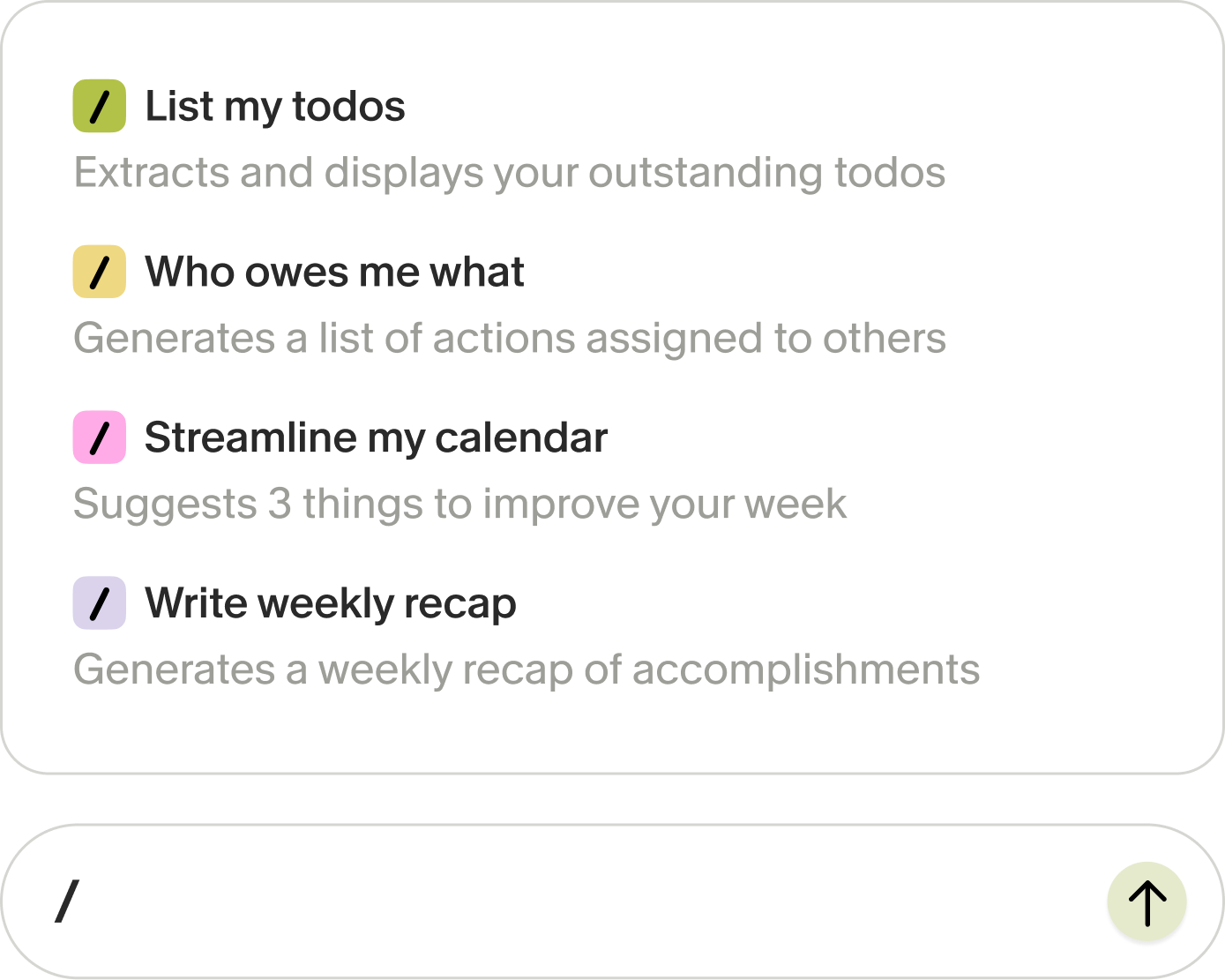
Recipes make this practical. You can bring up the recipes menu by typing "/" in the floating chat bar, which shows default recipes, ones you have created, and any shared by your team. Granola also ships pre-built options, including a "Prep my day" recipe that briefs you on every meeting on your calendar with where you left off and what you promised.
Building briefings from meeting data
Your briefing is only as good as its inputs. Granola's human-in-the-loop approach matters here: you jot rough notes during the conversation, Granola transcribes as you go, then enhances your notes with context from the transcript. The AI fills in supporting detail around what you flagged as important, so the raw material reflects your judgment rather than a generic summary.
"I love that you can blend shorthand with AI notes. It's also super intuitive and super easy to use. The interface is clean and simple. I use this nearly every day for work." - Mason K. on G2
Configuring your daily meeting digest
A daily briefing from meetings uses the same Recipe as the weekly version, scoped to a shorter window. Add a time constraint to your query, such as "today," "yesterday," or "this week," to filter irrelevant history.
For a daily digest, a time constraint like "today" is usually enough to keep results focused. For a quarterly pattern query, scope your query to a folder or use a broader time window.
Set up your recurring briefing
Here is the full setup, start to finish. Total time: under 5 minutes for the tooling, plus 10 to 15 minutes to draft your prompt.
1. Select your meeting data sources
Download the Mac or Windows app, sign in with your Google or Microsoft account, connect your calendar, and grant microphone access so Granola can transcribe device audio. The setup checklist gets you from download to your first transcribed meeting in under five minutes, and the integrations guide covers connecting the rest of your stack.
Then organize. Create folders for your recurring meeting types (customer interviews, discovery calls, sprint ceremonies) so your briefing can target exactly the conversations that matter.
2. Design your custom AI summary prompt
Open the chat bar at the bottom of any meeting note, type "/", and create a new Recipe. Write detailed instructions for what you want analyzed and how you want results formatted, then paste in an example output so the structure is unambiguous.
A solid starting prompt for a weekly research briefing:
You are preparing my weekly meeting briefing.
Pull from all meetings in the [your folder name] folder from the past 7 days.
Structure the output with these exact headings:
## Decisions made
## Commitments (owner + deadline)
## Customer signals (quote the customer's exact words, cite the meeting)
## Coming up next week
Rules:
- Keep each section under 6 bullets.
- Cite the source meeting for every bullet.
- Flag any topic raised by 2+ participants as a pattern.
3. Curate your daily briefing inputs
Decide which meetings feed which briefing. Each briefing should draw from the meetings that match its purpose: a customer research briefing from your interview folder, a pipeline briefing from your sales calls, and an internal sync briefing from team check-ins. You can select meetings individually, query a whole folder, or query across every meeting with a time constraint.
A practical example of what this enables downstream: once your meetings are indexed, you can ask Chat to draft a personalized follow-up email that acknowledges specific details a customer mentioned, because the Recipe extracts the exact feature requests and pain points from the transcript.
4. Timing your recurring AI reports
Run the daily digest first thing in the morning against yesterday's meetings, or pair it with the "Prep my day" recipe before your first call. Run the weekly meeting summary Friday afternoon while the week is fresh, and share it immediately.
Prompt distribution tip: Share the briefing immediately after generating it. A summary that lands in Slack within the hour gets read. One that sits in drafts until Monday gets skipped. The Slack integration (Business plan and up) can auto-post summaries to a channel so distribution is not a manual step.
Setup and security in under 5 minutes
Granola's setup path takes under 5 minutes from download to first transcribed meeting:
- Audio deletion: Device audio is transcribed in real time, then deleted. No recordings stored, ever.
- No third-party training: Your transcripts are never used to train third-party AI models. Granola earned SOC 2 Type 2 certification.
- Participant transparency: Use the transparency features, including the automatic in-chat notification and video watermark, to let everyone in the meeting know notes are being captured.
Folder-level permissions let you control who sees which conversations.
Refining your weekly meeting summary workflow
Verify summaries with source records
The most common objection to automated briefings is trust: what if the summary misses nuance or misattributes a quote? Inline citations are the answer. Chat proactively tells you which notes it refers to, so you can redirect it toward conversations it has not considered and verify any claim against the source transcript before sharing.
One honest trade-off: Granola stores no audio, so you verify against the transcript rather than a recording. That is a deliberate privacy-first choice, and the transcript plus your own jotted notes is usually the better record anyway.
Time saved per week
Manual synthesis vs. automated briefing, based on 6 customer interviews weekly:
| Task | Manual workflow | Granola workflow | Time saved |
|---|---|---|---|
| Note-taking during calls | Typing continuously while listening | Jotting key points as they arise | Significant reduction |
| Post-call cleanup | Expanding shorthand into full notes | Enhancement happens automatically | Eliminated |
| Weekly synthesis | Re-reading notes and drafting summaries | Run Recipe and verify citations | Reduced to minutes |
These are conservative estimates based on common patterns reported by users. Actual time saved depends on meeting frequency, synthesis rigor, and stakeholder distribution needs.
Tracking project blockers from meetings
Briefings compound. Week one's output is a summary. Week twelve's is a trend line: which blockers keep recurring, which commitments keep slipping, which customer requests have appeared five times without action. Because the same Recipe runs over a growing archive, the marginal cost of each briefing stays flat while the analytical value rises. Folder-level queries surface patterns across every conversation in your history.
For teams ready to go further, the Zapier integration connects meeting notes to over 8,000 apps, so briefing outputs can trigger tasks, CRM updates, or tracker entries automatically.
Automated team briefing workflows
The final refinement is moving from a personal briefing to a team one. Shared folders mean the whole product team queries the same archive, and org-wide controls on the Enterprise plan let admins manage sharing and retention centrally.
Try Granola for free. Download the Mac or Windows app, connect your calendar, and run your next meeting to see your first briefing in action.
FAQs
Can I create both daily and weekly briefings?
Yes. Save separate Recipes tuned to daily and weekly cadences, or adjust your query scope when running the same Recipe. Both pull from the same folders and meeting archive.
What happens if I miss meetings during the period?
The briefing summarizes whatever meetings exist in the window you specify. A lighter week simply produces a shorter briefing from the meetings that did happen.
Can I edit the briefing before sharing it?
Yes. You can edit, delete, or refine anything in your notes before sharing, and you control what goes out.
Key terms glossary
AI briefing: A structured summary generated by running a saved prompt across a set of meetings, covering decisions, commitments, and upcoming work.
Recipe: A reusable prompt template in Granola that processes meeting content in a specific way, so you never retype the same instructions.
Folder-level query: A Chat question scoped to a shared folder, synthesizing answers across every meeting in that folder with citations.
Source-linked citation: An inline reference in Chat output that lets you double-click into the exact meeting and transcript behind any claim.
Human-in-the-loop enhancement: Granola's workflow where your jotted notes guide the AI, which fills in supporting detail from the transcript while preserving your judgment.