





Virtual meeting facilitation best practices
July 24
TL;DR: The hardest part of virtual facilitation isn't the agenda or the technology: It's staying genuinely present while also capturing what happens. The moment you start typing notes, you stop reading the room. You miss the hesitation before a hedged answer, the compressed lips when someone disagrees but won't say so. That's when facilitation breaks down. The fix isn't better note-taking technique: It's removing the trade-off entirely. Jot two or three anchor words during the call, click "Enhance notes" after, and Granola builds structured documentation from your transcript in seconds. You stay focused on the people in the room. Your notes arrive intact.
Most virtual meetings fail not because the agenda is wrong, but because distractions like note-taking mean the facilitator never notices that half the group has mentally checked out. Running a great virtual session requires a different skill set than in-person facilitation. The signals are subtler, energy dissipates faster, and the documentation problem is much harder to solve without disrupting the conversation you are trying to have.
This guide covers facilitation tactics that work in a screen-based room, for any kind of session, and explains how to capture what you learn without sacrificing the quality of the discussion.
Why virtual sessions demand unique facilitation
You face extra cognitive load when you facilitate remotely. Processing compressed nonverbal cues through a camera, managing the feeling of constant eye contact, restricted movement, and monitoring your own video feed all create cognitive tax, a pattern documented by Stanford researcher Jeremy Bailenson as the structural cause of Zoom fatigue. Across session types (customer interviews, cross-functional workshops, training sessions, and sales reviews) this fatigue compounds. You are managing your own cognitive load while actively trying to read the room through a webcam and guide a structured conversation. Adding manual note-taking to that stack is not a minor inconvenience, it is a meaningful hit to your ability to do the actual work.
Cutting setup friction before a call frees mental bandwidth for the conversation itself. Use this checklist to arrive ready.
Virtual meeting facilitator checklist
| Phase | Task | Time required |
|---|---|---|
| Pre-meeting | Sync calendar, open Granola, and select a custom meeting template | 5 minutes |
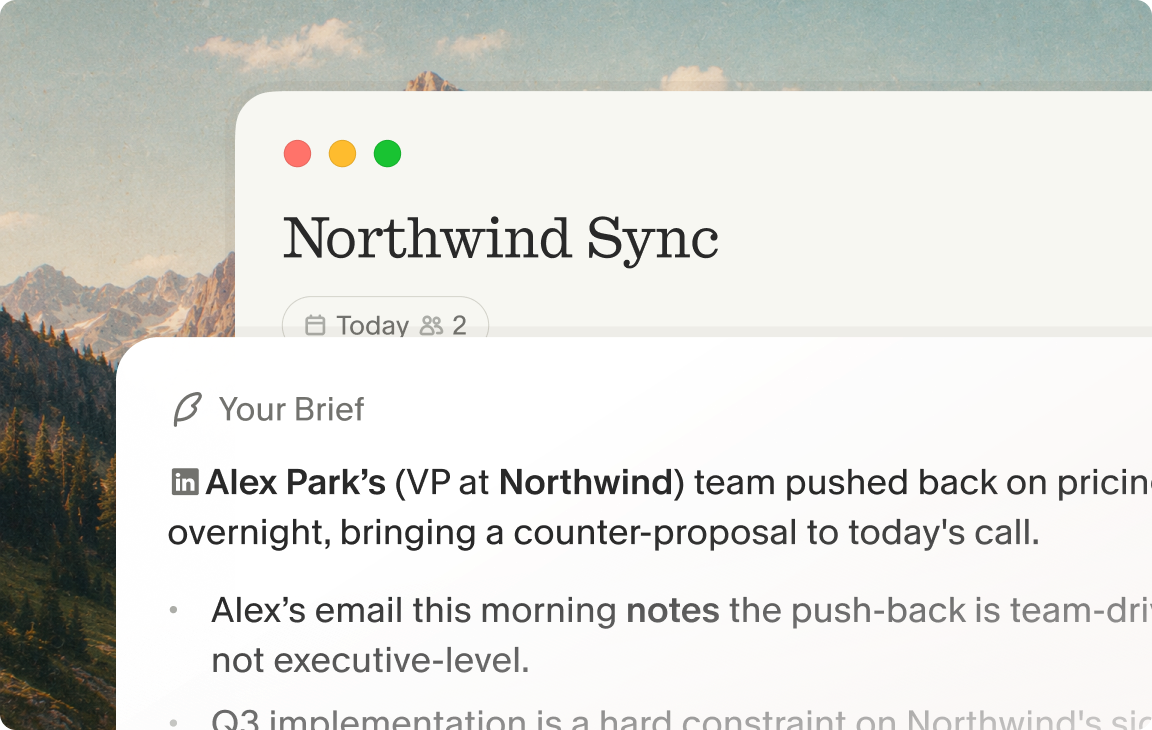
| Pre-meeting | Review your pre-meeting brief (open threads, context, agenda points) | A few minutes |
| During meeting | Jot anchor words (e.g., "pricing friction," "Single Sign-On hesitation") while maintaining eye contact | As needed |
| Post-meeting | Click "Enhance notes," then query your folder for cross-meeting patterns | A few minutes |
The Granola desktop app syncs your calendar automatically and surfaces a pre-meeting brief before each call, so you walk in with open threads and relevant context already surfaced rather than scrambling to remember what you discussed three weeks ago.
Decoding nonverbal signals online
Your webcam compresses the signal. You are reading a face in a small rectangle, often with inconsistent lighting, at a frame rate that drops when bandwidth fluctuates. The behavioral markers that signal discomfort or disagreement are still there, but you need more deliberate attention to catch them.
Watch for three patterns that show up across most virtual sessions: Pursed or compressed lips when you describe an idea or proposal can suggest the person disagrees but is choosing not to say so, repeated camera avoidance when a sensitive topic surfaces sometimes signals discomfort rather than distraction, and a sharp intake of breath before a hedged answer can precede soft pushback worth probing.
Some facilitators rely on audio playback after the call to catch moments they missed live. The better fix is eliminating the reason for distraction during the call: If you are not typing, your eyes stay on the participant and you catch the micro-hesitation in real time.
Interpreting silence in virtual calls
Silence in a virtual call carries more signal than it appears to. Three types show up across virtual sessions and each requires a different response. Processing silence means the participant is genuinely thinking, so interrupting kills a developing insight. Confusion silence means the participant is not sure what you asked, wait for the slight furrowed brow and lean toward the screen, then clarify. Reluctance silence is the most valuable: Watch for the participant starting to speak, stopping, and then offering a heavily qualified response. That is the moment to offer a softer reframe and let them try again.
Boost participation with structured agendas
A structured agenda does not constrain a discovery conversation, it protects it. Without structure, dominant voices take over, quieter participants disengage, and the conversation drifts away from the questions that actually matter. Sharing a lightweight agenda with attendees 24 hours before the session sets clear expectations. One or two sentences on what you will cover, and what kind of input you are looking for, is enough. For research and interview sessions specifically, avoid sending discussion guides in advance, because you want reactions, not prepared responses.
For workshops or retrospectives, a brief pre-read or framing doc helps participants arrive ready to contribute.
Fair turn-taking for better engagement
Treat dominant voices as a structural problem, not a personality one. When you leave turn-taking to chance, the people most comfortable with silence speak most. To redistribute floor time, use explicit round-robin structures for key questions: "I want to hear from everyone on this one. Let us go alphabetically" is enough.
Acknowledge contributions briefly before moving on, and park detailed tangents with a visible note: "That is important. I am capturing it and we can return." For sessions with larger groups (eight or more participants), assigning a co-facilitator whose only job is to monitor the chat and surface contributions from quieter participants prevents insights from dying in the scroll.
Structuring input to boost engagement
Parallel silent input works particularly well for virtual sessions. Instead of asking a group question and waiting for someone to speak, share a Miro board, Figma prototype, or a simple Google Doc and give participants two to three minutes to add their reactions simultaneously. You get input from everyone, introverts are not penalized, and you collect a richer dataset than sequential discussion produces. For research sessions, a shared wireframe with sticky-note annotations generates more candid reactions than a verbal walkthrough because participants respond to the artifact rather than to you. For cross-functional workshops, a shared working document or a prioritization grid achieves the same effect: People engage with something concrete rather than waiting to be called on.
How to prime participants before the session
Participant mindset shapes output quality before the session begins. Someone who understands why they are in the room and what kind of input is useful will engage more honestly and specifically than someone arriving cold. A quick framing note covering what the session is for, what you are not trying to do, and what a good contribution looks like shifts that dynamic. Granola's pre-meeting briefs feature pulls relevant context from your calendar and past meetings so you walk in knowing what was discussed in previous sessions with these attendees, which lets you open the conversation with context rather than starting from scratch.
Drive active engagement using chat and polls
The chat box and polling features in Zoom, Meet, and Teams are under-used facilitation tools. Most facilitators treat them as logistics channels. Used intentionally, they function as parallel input streams that keep participants engaged even when they are not speaking and generate raw data immediately useful for synthesis.
When to use chat vs. voice
Set a clear protocol at the start of the session. Voice is for discussion and elaboration. Chat is for reactions, quick confirmations, and questions that would otherwise interrupt the flow. A simple instruction up front, "Feel free to drop reactions or questions in the chat as we go and I will pull them in," normalizes participation without creating chaos. For a product walkthrough or structured review, you might add: "As we go through each section, drop questions in the chat and I will address them without breaking the flow."
Best poll styles for quick reactions
Three poll formats produce reliable engagement. First, scale polls (1-5) for immediate reactions: "How useful would this be to your team?" or "How often does this situation come up for you?" forces a comparable, quantifiable answer across sessions. Second, word cloud polls for vocabulary discovery: "What three words describe how you feel about this?" surfaces language you can use directly. Third, multiple-choice polls for prioritization: "Which of these would change how you work most?" reveals stated preferences quickly.
Turning chat data into actionable notes
The chat log is often the most candid data from a virtual session. People who hedge in spoken answers frequently type more direct reactions in the chat. Collect it systematically: Export it at the end of every session and treat it as a valuable source alongside your notes.
Granola captures your full meeting context through device audio, transcribing in real time so you can stay in the conversation. You can incorporate the chat log into your documentation workflow alongside your anchor-word jottings, then click "Enhance notes" to create a structured document. The result is one unified source of truth rather than a transcript in one tab and a chat export in another.
Synthesis time-saver comparison
| Task | Manual method | Granola method | Benefit |
|---|---|---|---|
| Note-taking | Typing during the call | Jotting anchor words | Significant per call |
| Transcription | Uploading audio to a third-party tool | Real-time device capture, audio deleted | Immediate |
| Synthesis | Tagging and organizing quotes manually | Folder-level AI queries with citations | Largest gain |
Proven tactics for active virtual sessions
Use 15-minute phases to maintain energy
A 45-minute virtual session works best as three distinct phases rather than one continuous conversation. The first phase (minutes 0-15) establishes context: Who is in the room, what the group is working with, and what success looks like today. The second phase (minutes 15-30) probes the core work: Going deeper on the questions, decisions, or research themes that are the session's purpose. The third phase (minutes 30-45) closes the loop: What better would look like, what trade-offs apply, and what has been missed.
Signal each phase shift clearly: "That gives me great context on where we are today. Let me shift to the core question we need to answer." The explicit transition resets attention and signals that you are moving to the heart of the session.
Keep energy high with scheduled pauses
Strategic silence is a facilitation tool. After a participant answers, pause for three to four seconds before responding or moving on. Most facilitators fill silence immediately, which signals that quick, surface-level answers are acceptable. A deliberate pause communicates that you have time and want more. Participants almost always fill it with the more honest, more detailed version of what they just said.
This approach also removes the pressure to type quickly during the session. You stay in the conversation rather than in your notes. When you jot "budget concern" or "timeline pushback" during that pause, Granola's human-in-the-loop approach fills in the exact context and participant quotes afterward, so nothing is lost.
Drawing out quiet voices during calls
Three principles handle the most common participation gaps. For audio-only participants, explicitly invite chat participation without applying pressure. For disengaged participants, direct a question to their specific role or expertise. For dominant voices, acknowledge their point then redirect to other perspectives. One model script: "That is a great point on scalability. Let us pause there to hear how the design team views the user experience side of this feature." These scripts are specific enough to be useful without feeling rehearsed.
Mastering nonverbal cues in virtual sessions
Managing cadence and detecting hesitation
Speaking pace is a facilitation variable most facilitators underestimate. A slower, more deliberate rate, roughly 15-20% slower than your natural pace in casual conversation, signals that you are not rushing and gives the participant time to think before responding. Intentional pauses after questions (three to five seconds) reinforce this.
Watch for micro-hesitations during those pauses, because they are the most valuable moments in a virtual session. They appear when a participant has an honest reaction that conflicts with what they think they should say: A sharp intake of breath before a hedged answer, a brief lip compression before offering qualified praise, or a slight upward glance before politely disagreeing. When you catch one, do not rush past it. A simple "it sounds like there might be something else there" or "what would make you hesitant about that?" often unlocks the real insight the participant was editing.
Using micro-polls for instant feedback
A quick informal scale question mid-session resets energy and produces actionable data. "On a scale of 1 to 5, how often does this situation come up for your team?" takes fifteen seconds and gives you a data point you can compare across sessions. It also signals to the participant that their subjective experience is the point, which loosens the conversation. Keep these to one or two per session. The Granola Chat feature lets you query across all your past sessions afterward, so "What ratings came up most often across our sessions this quarter?" becomes an answerable question with source-linked citations.
Closing the loop with attendees
The post-session protocol is part of quality facilitation, not just courtesy. Thank participants specifically for what they shared rather than generically for their time. Set clear expectations about what happens next: Whether you will share findings, and whether you will reach out again. For ongoing working relationships (a recurring customer check-in, a multi-session workshop series, or a repeat stakeholder conversation) Granola's pre-meeting brief feature surfaces what you discussed last time before the next session, so your follow-up references something specific rather than starting from scratch.
Capture meeting insights without losing focus
Balancing active listening and documentation
The core tension you face in facilitation is not about tools, it is about attention. You cannot maintain genuine eye contact, track nonverbal signals, and type accurate notes simultaneously. Something has to give, and what usually gives is documentation quality. Most facilitators accept incomplete notes as the cost of staying present in the conversation.
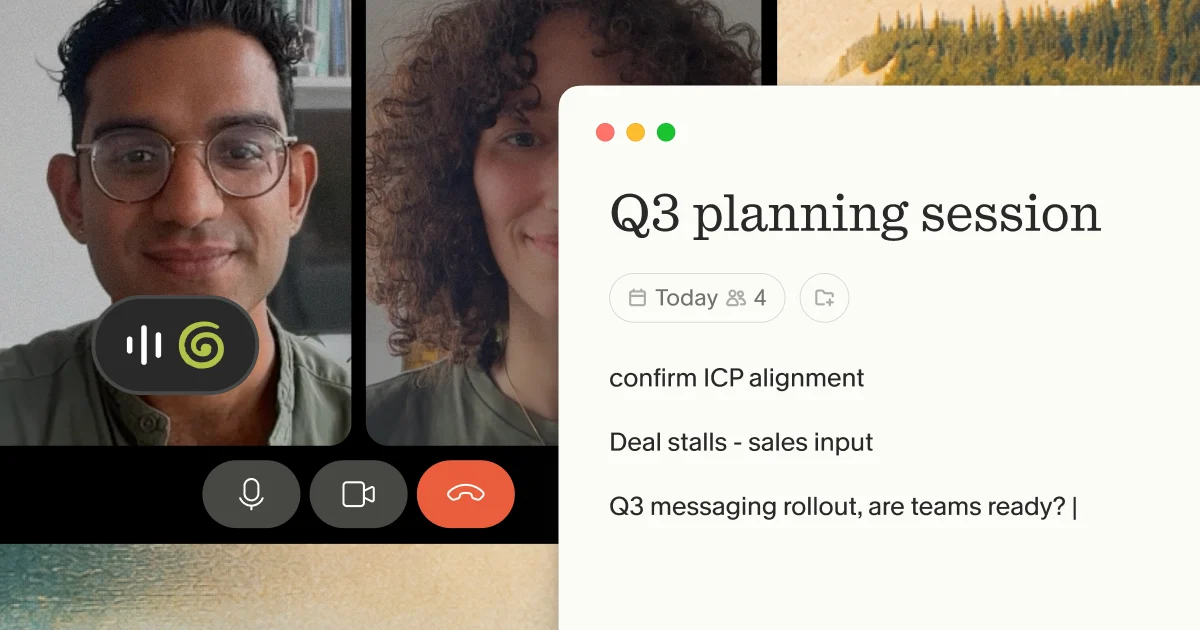
Granola resolves this differently. Because it captures device audio and transcribes in real time without joining the call as a visible participant, you jot two or three anchor words and let the AI handle the rest. Your rough notes guide the enhancement: Write "pricing hesitation" and Granola finds every pricing-related exchange in the transcript and surfaces the relevant quotes. Your notes stay in black. AI additions appear in gray. You decide what stays.
Best practices for meeting capture
The Granola workflow follows four steps: Capture device audio, transcribe automatically, enhance notes with AI, then search and share.
- Launch Granola: Download the desktop app and grant microphone permissions. Setup takes under five minutes once you connect your calendar.
- Jot anchors: During the conversation, type minimal anchor words to guide the AI. "Onboarding friction" is enough. Full sentences are not necessary.
- Enhance notes: Click "Enhance notes" immediately after the call. Structured documentation, including exact participant quotes, appears within seconds.
- Query your folder: Use Granola Chat to query across all past meetings. "What did stakeholders say about timeline concerns in Q1?" returns source-linked citations from every relevant conversation. On the compliance side, Granola is SOC 2 Type 2 certified. The platform is also GDPR compliant.
No audio files are stored anywhere. Device audio is transcribed in real time and then deleted, which means there is no audio file to leak or share accidentally. Third-party AI providers are contractually prohibited from training models on your data, and Enterprise accounts have model training off by default across the entire organization.
For transparency with your own participants, Granola lets you display a watermark or post an automated chat message so attendees know Granola is active, supporting informed consent without a disruptive bot announcement.
Prioritize active listening over notes
Your primary job as a facilitator is to listen, probe, and make the participant feel heard. Documentation is a secondary task, and it is one technology handles better than you can while you are doing the primary work. The compounding value comes in cross-session synthesis: Querying patterns across months of conversations that would otherwise require hours of manual review. Pedro Franceschi, CEO of Brex, has described Granola as a tool that "earned our trust by delivering precise, reliable summaries, and helped strengthen our written culture" as Brex rebuilds as an AI-native company. For facilitators whose credibility depends on accurate, defensible documentation, that precision is what turns individual conversations into institutional memory.
Try Granola free on Mac or Windows. Download the Mac, Windows, iOS or Android app, connect your calendar, and run your next virtual session with full attention on the people in the room. Setup takes under five minutes and your first enhanced notes arrive immediately after the call.
FAQs
How do I handle participants who won't turn on cameras?
Acknowledge their preference early without making it a moment, then offer the chat box as a primary participation channel and focus on verbal cues: Tone, pacing, hesitation, and word choice. Audio-only participants sometimes give more candid answers when the reduced visibility lowers the feeling of being watched.
What should I do when engagement drops during a virtual session?
Shift from open-ended questions to something concrete, like sharing a document, prototype, or visual and asking for a specific reaction rather than a general opinion. A quick informal scale question ("On a scale of 1 to 5, how often does this situation come up?") also resets energy by making the participant's response feel immediately useful.
What is the ideal length for a virtual session?
Keep focused virtual sessions to 30 or 45 minutes. Anything longer produces diminishing returns as cognitive fatigue sets in and contributions become more guarded and less useful. If the agenda requires more time, split it across two shorter sessions rather than extending a single call.
Should I transcribe my virtual sessions?
Yes. Transcription ensures you capture exact language, decisions, and commitments rather than relying on memory.
Key terms glossary
Synthesis: The process of turning raw meeting transcripts and notes into structured, actionable insights by identifying patterns, tagging themes, and extracting representative quotes.
Pre-meeting brief: A summary of relevant context surfaced before a call begins, drawing on calendar data and past meeting notes. It surfaces open threads, prior discussion topics, and participant history so you enter the conversation prepared rather than starting from scratch.
Human-in-the-loop: An approach to AI-assisted work where the human provides the initial structure or judgment and the AI fills in supporting detail. In Granola's workflow, the facilitator jots rough anchor words and the AI enhances them using transcript context, keeping the human in control of what the final notes say.