





Get meeting notes and action items into your CRM automatically
September 4
TL;DR: Manual CRM data entry costs teams running customer-facing calls hours they can't recover, and generic bots dump unreadable transcripts that bury the insights your team needs. Granola solves both problems: you jot what matters during discovery calls, AI enhances your notes with exact participant quotes and context, and the structured result syncs automatically to HubSpot, Attio, or Affinity. This guide covers folder-level triggers that sync notes without manual pushing, field mapping for custom CRM properties, Zapier routing for Salesforce and other tools, and how to keep sensitive research conversations out of your pipeline while building a searchable repository your team actually uses.
Most customer insights die between the meeting and the CRM. You finish a discovery call with clear signals about a prospect's priorities, open your CRM to log the outcome, and face a choice: spend time capturing everything accurately, or type a brief summary and lose half the detail. Either way, your pipeline data starts reflecting memory rather than reality.
Letting a bot transcribe everything produces the opposite problem. A wall of raw transcript attached to a HubSpot deal record isn't useful. The noise buries the signal, and your teammates won't read it.
Granola takes a third approach. You jot rough notes during the call, Granola enhances them with transcript context afterward, and the structured result goes directly to your CRM. Your judgment stays in the loop. The admin work disappears.
The ROI of automated CRM sync
Customer research generates its own category of CRM problem. Some teams need pipeline data. Others need discovery patterns. Both groups lose hours a week when those two needs aren't met automatically.
For teams running four to eight customer-facing calls a week, the math compounds quickly. Admin time after each interview adds up fast across a full week of calls. That's time that could go toward synthesis, roadmap work, or the next interview.
What automated CRM sync gives you:
- Discovery patterns stay current: every interview adds to a live record instead of a static document
- Research debt disappears: stakeholders query past findings instead of asking you to repeat work
- Synthesis time drops: structured notes push directly to contact records without manual reorganization
- Institutional knowledge persists: customer insights outlive team member tenure
"The time saved in adding notes to CRM and removed from admin follow ups... being able to actively listen and engage in the meeting, knowing that all important actions and talking points are noted." - Rakeem L. on G2
Automate syncing and keep CRM data current
The manual workflow breaks down under volume. When you're running six customer-facing calls a week alongside other commitments, the manual CRM step is the first thing that slips. Automated syncing removes it entirely: you finish the meeting, review Granola's enhanced notes, and the structured summary pushes to the matching CRM record.
Keeping CRM data current also solves a research debt problem. Teams repeat questions they've already answered because no one can find past findings. With Granola's integrations pushing structured notes to your CRM on every call, each discovery session adds to a live record rather than a static document that goes stale. Pull up a contact record before a follow-up call and see exactly what a customer said about their workflow three months ago, not a paraphrase from memory.
Find customer feedback in your CRM
Searchable CRM records change how stakeholders engage with research. When findings live as structured notes on the relevant contact or deal record, the response to "is this just one customer?" becomes a search rather than a debate. You pull up the CRM record, show the pattern across three conversations, and cite the exact quotes. Research that's findable is research that's harder to dismiss.
Granola Chat extends this further: query across all your past discovery calls with a question like "What did customers say about reporting features?" and get source-linked citations from every relevant conversation.
Sync customer insights to CRM records instantly
Two paths exist for getting Granola notes into your CRM: native integrations for HubSpot, Attio, and Affinity, and Zapier for Salesforce and anything else. Here's how the two approaches compare:
| Feature | Native CRM logging | Zapier workflows |
|---|---|---|
| Setup time | Quick setup via OAuth | Longer initial setup in Zap editor |
| Supported CRMs | HubSpot, Attio, Affinity | Salesforce and 8,000+ apps |
| Field mapping | Fixed to standard note and activity fields | Custom: map any Granola output to any CRM field |
| Auto-sync | Folder-level triggers available | Trigger-based, with optional filtering logic |
| Maintenance | Minimal after initial auth | Requires monitoring for Zap errors |
The Granola + Zapier integration connects your notes to over 8,000 apps, which covers cases where a native integration doesn't exist.
Choose native integrations when you want minimal setup and maintenance. Choose Zapier when you need custom field mapping, complex filtering logic, or connection to a CRM without native support. Both paths support folder-level auto-sync, so the technical routing doesn't change your daily workflow.
Why structured notes beat raw transcripts
Raw transcripts attached to CRM records create noise. Structured notes create signal. The difference comes from how Granola's AI enhancement works: you jot what matters during the meeting, such as pricing concerns or objections raised, and Granola finds the relevant sections in the transcript and adds supporting context. The result is a note organized around your priorities, not around the order things were said.
For structured qualification frameworks, this means your CRM record reflects:
- Which dimensions of the deal were discussed and what was said about each, rather than leaving that extraction to whoever reads the transcript later
- Action items with owners and dates, formatted as a checklist you can sync to HubSpot activity feeds or as separate tasks via Zapier
- Exact customer language that supports or contradicts your roadmap assumptions, attached to the Contact record for future conversations
- Deal stage signals captured during the call, ready to trigger an automated update once you've reviewed and confirmed the outcome
HubSpot integration for automated note syncing
The Granola HubSpot integration is the most direct path for teams that need meeting notes on Contact and Deal records in HubSpot. Setup requires appropriate CRM permissions in your HubSpot account and a Granola Business plan.
Syncing meeting notes to HubSpot
- Open Settings in Granola and navigate to Integrations.
- Click Connect next to HubSpot and authorize the connection in the browser window that opens.
- Log into HubSpot, grant the requested permissions, and return to Granola, where the integration status updates to connected.
- Choose your sync type: configure whether Granola creates a Meeting (which includes duration and participants) or a Note (text only) in HubSpot. Both appear as engagement activities on the Contact timeline, so they show up in the activity feed your team already reviews rather than buried in a custom object.
For high-volume pipelines, folder-level auto-sync removes the manual push step entirely. In any Granola folder, click the Integration Settings button and turn on the HubSpot option. From that point, any note you add to the folder automatically syncs to matching Contact, Company, or Deal records based on attendee email addresses from your calendar invite.
Mapping fields and contact associations
The native HubSpot integration maps to standard note and activity fields. If you need to populate custom properties, such as a "Feature requests" field or a deal stage signal, use Zapier to map specific Granola output sections to those fields directly.
Granola typically matches meeting attendees to the right Contact, Company, or Deal record automatically based on attendee information, surfacing the match before the note syncs. You confirm or adjust the match before syncing.
Workspace scoping applies the integration at the team workspace level rather than being tied to individual domain settings, which matters if your team works across multiple client domains. This prevents notes from syncing to the wrong CRM account when multiple domains are in use.
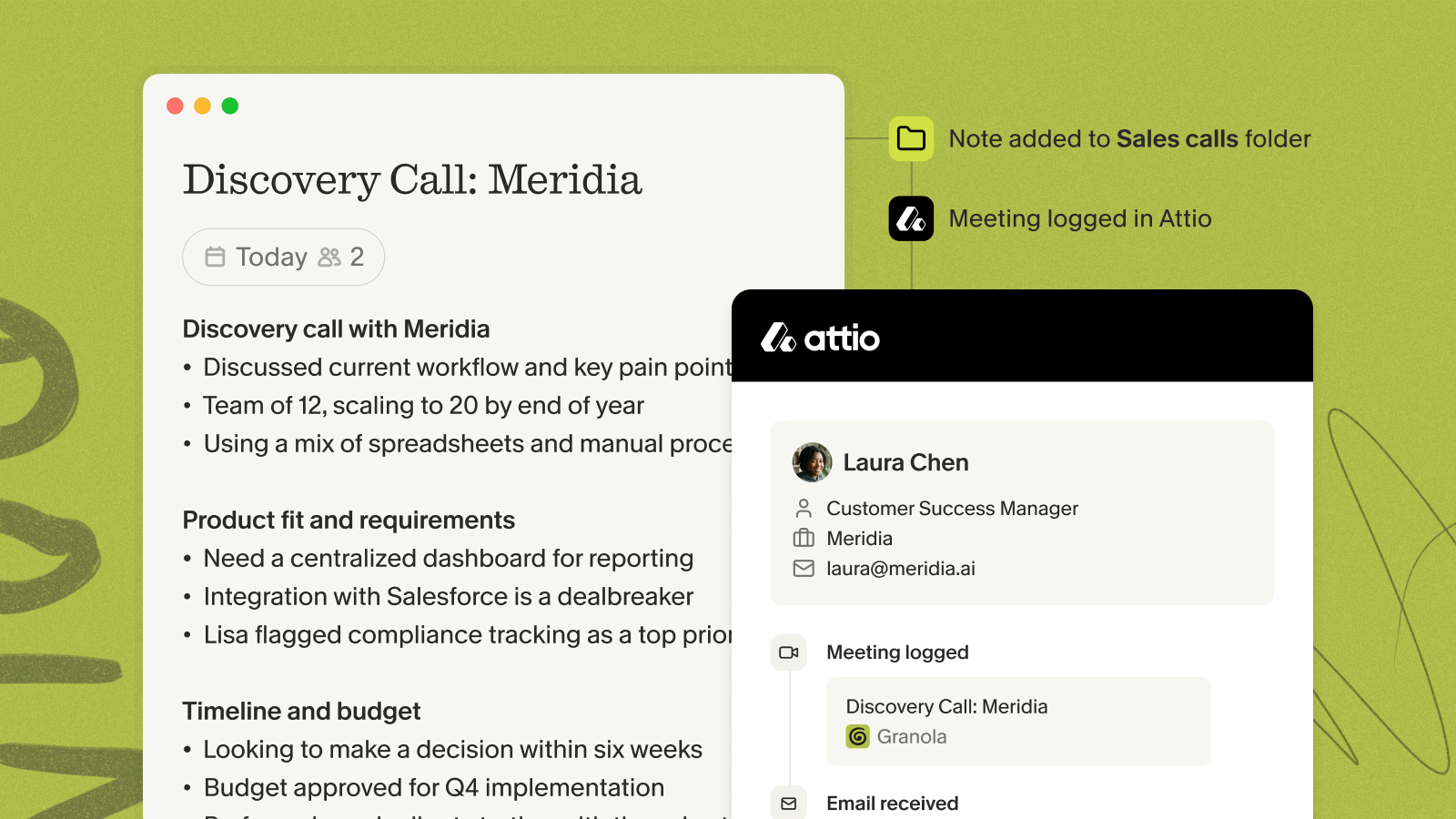
Attio syncing for research findings
Attio suits teams that organize their CRM around relationships and research rather than pure pipeline management. Connect Attio through Settings under Integrations, then configure either manual push per meeting or folder-level auto-sync to a designated folder like "Customer Interviews."
After syncing, notes appear on the correct Person, Company, or Deal record in Attio. For custom objects beyond Attio's defaults, use Zapier to route the data and map specific Granola sections to custom attributes.
Before any data reaches Attio, structure your meeting templates around the questions you ask in discovery calls. A template with labeled sections for pain points, feature requests, and objections maps directly to Attio custom attributes. A generic summary requires manual reorganization before it's actionable. A note structured around the questions you actually asked doesn't.
The research that prevents building the wrong thing only has value if it reaches the people making decisions. Attio sync closes that gap: your interview notes land in the relationship records your team already references, and you can query across those records in Granola to surface patterns before pointing stakeholders to the source material.
CRM updates for Affinity teams
Affinity fits teams managing relationship-heavy workflows, including VC partnerships and agency pipelines. Connect Affinity through Settings under Integrations, then confirm the connection is active before proceeding. After connecting, Affinity appears as a sharing option in any Granola note. Review your enhanced notes, then push the structured summary to the matching Person or Company record with one click.
Affinity's relationship intelligence pairs naturally with Granola's People & Companies views, which organize your notes around the people appearing across your meetings. Granola's pre-meeting briefs surface that history before a call starts, and the synced Affinity record gives your team the same context when a new person joins the conversation.
For deal-stage updates, use Zapier to map specific Granola template fields, such as an "Outcome" section, to Affinity deal properties. This creates a reviewable flow: meeting ends, notes are enhanced, you verify the outcome field, and Zapier updates the deal stage field based on what you captured.
Sync research to any CRM using Zapier
For CRMs without a native Granola integration, Zapier is the routing layer.
Setting up the Zap
- Trigger: Select the Granola trigger that fires when a note is added to a designated folder, such as "Discovery Calls."
- Filter (optional): Add a Zapier Filter step that checks whether the meeting title contains a specific keyword, so only relevant meeting types trigger the sync.
- Action: Map Granola note output to the target CRM object, such as Account, Opportunity, or Contact.
You review and edit your notes in Granola before they sync, so only the content you've checked reaches your CRM.
Syncing notes to other CRMs
With Zapier, you choose exactly which Granola output maps to which CRM field, add filtering logic so only specific meeting types sync, and chain multiple actions in a single workflow. This flexibility makes Zapier the right choice for any CRM that doesn't yet have a native Granola integration, and it gives you more control over field mapping than the native integrations allow even for HubSpot, Attio, and Affinity.
Typical hurdles with meeting note syncs
Three integration questions come up repeatedly:
- How do I keep personal or confidential meetings out of the CRM?
- What happens when a meeting attendee doesn't exist as a contact yet?
- Should action items sync as CRM tasks or as fields in the deal record?
Keeping the right meetings out of your CRM
Folder-level controls solve this: only meetings you add to a designated folder trigger the sync. Meetings in other folders stay in Granola and don't push to your CRM. For per-note control, use the manual sharing option so you review each note before it syncs.
The Granola transparency features also let you configure how participants are informed that Granola is transcribing, either through an automated chat message or a video watermark. For research conversations where participant comfort with documentation is part of your practice, the consent and AI note-taking guide explains how to handle this before transcription begins.
Creating new CRM records from notes
Granola typically matches attendees to existing CRM records automatically but doesn't create new records in the process. Create the CRM record before syncing, or use a Zapier "Find or Create" action in your workflow to handle new contacts automatically and keep your CRM clean without manual intervention.
Mapping action items to CRM tasks
Action items with owners and dates log to HubSpot activity feeds directly through the native integration, or push as separate CRM tasks through Zapier. For deal-stage updates, the recommended workflow is: finish the meeting, review Granola's enhanced notes, verify the outcome field reflects the actual meeting result, then let the Zapier trigger fire. This keeps a human in the loop before pipeline data changes, which matters when CRM accuracy drives forecasting and roadmap decisions.
Team access and security
Notes that Granola pushes to a HubSpot Contact or Attio record are visible to team members with access to that record in your CRM, following your existing CRM permission structure.
Granola achieved SOC 2 Type 2 certification in July 2025, completing the audit in three months rather than the typical twelve to eighteen, because the architecture deletes audio immediately after transcription. Third-party AI providers are contractually prohibited from training on your data.
Try Granola for free, download the Mac or Windows app, connect your calendar, and run your next meeting to see the CRM sync in action.
For teams that want to extend meeting context into AI tools like Claude or ChatGPT, the Granola MCP connector is available on all plans and lets compatible AI tools access your meeting notes so your agents start from what you actually talked about.
FAQs
How does Granola protect sensitive customer data?
Granola is SOC 2 Type 2 certified as of July 2025 and deletes all audio immediately after transcription. Third-party AI providers are contractually prohibited from training on your data, and Granola is GDPR compliant.
Can I choose which meetings sync to my CRM?
Yes. Folder-level triggers mean only meetings you add to a designated folder push to your CRM automatically. Use the manual sharing option for per-meeting control, and leave any meeting outside the designated folder to keep it out of your CRM entirely.
Do I need a paid plan for CRM integrations?
Native connections to HubSpot, Attio, and Affinity, plus Zapier access for Salesforce and other tools, are available starting at $14/user/month on the Business plan. The Basic plan does not include CRM integrations.
What happens when a meeting attendee doesn't exist in my CRM?
Granola typically matches attendees to existing CRM records automatically but doesn't create new records in the process. Create the CRM record before syncing, or use a Zapier "Find or Create" action to handle new contacts automatically.
How does workspace scoping differ from domain scoping?
Workspace scoping limits CRM syncing to your specific Granola team workspace rather than applying rules across entire email domains. This matters for teams working across multiple client domains, because it prevents notes from syncing to the wrong CRM account when multiple domains are in use.
Key terms glossary
AI notepad: A digital notepad where you write rough notes during a meeting and AI enhances them with transcript context afterward, producing structured output that reflects your priorities rather than a raw transcript.
Workspace scoping: An integration setting that limits CRM syncing to a specific Granola team workspace rather than applying rules across entire email domains, giving teams precise control over which CRM account receives synced notes.
Device audio capture: Granola's method of transcribing meetings by capturing audio directly from your computer's system audio, which works across any meeting platform including Zoom, Google Meet, Teams, and in-person conversations without requiring a bot to join the call.
Auto folder triggering: A feature that automatically syncs every note added to a designated Granola folder to matching CRM records, removing the need to manually push notes after each meeting.
Research debt: Accumulated, unprocessed, or unfindable research insights that lead teams to repeat discovery work because past findings aren't accessible in a queryable format. Automated CRM syncing prevents research debt by making every customer conversation searchable from the CRM records your team already references.