How to fix unproductive meetings: A founder's guide
September 18
TL;DR: Unproductive meetings drain startup runway because they lack a clear purpose, include the wrong people, or fail to capture decisions, leaving teams repeating the same conversations. The fix starts with auditing your calendar using the 5 P's framework (Purpose, People, Process, Payoff, Preparation) and ends with building a searchable institutional memory so decisions outlast the call. Granola, an AI notepad, lets you jot what matters during a meeting and automatically enhances your notes from the transcript, so you stay present without losing context. Setup takes under 5 minutes.
For a founder on tight runway, meeting overload is a direct tax on focus and execution. Most of that time produces less than it should: when attendees are not fully engaged, conversations drift and decisions get deferred. The calendar problem and the engagement problem compound each other. Back-to-back calls leave no time to process what was decided, so teams return to the same topic the following week.
This guide gives you a practical framework for diagnosing why your meetings fail, a checklist for auditing your calendar, and a clear-eyed look at how a human-in-the-loop AI notepad captures decisions without pulling you out of the room.
Why meetings become unproductive
Meeting problems often trace back to structural failures that waste time and force teams to repeat the same conversations. Identifying which one applies to your team is the starting point for any fix.
No clear purpose or agenda
Without a stated objective, conversations default to whichever topic feels most urgent to the most senior person in the room. That might be useful once. When attendees arrive without shared context, the opening minutes often become a live alignment exercise that should have happened in writing the day before.
Wrong people in the room
Every non-essential attendee in a meeting has a cost, and at a startup it compounds: their time is not replaceable, their attention is not returnable, and their presence often shifts the conversation toward their domain rather than the decision at hand. Over-inviting is usually a sign of unclear ownership, not generosity.
Decisions aren't captured or tracked
The documentation gap is where most meeting value disappears. A productive conversation that produces no written record creates the illusion of progress while setting up a repetitive discussion the following week. Teams that rely on memory alone relitigate the same strategic questions because nobody can confidently say what was actually decided. Understanding the difference between meeting notes and formal minutes matters here: notes capture context and direction, while minutes capture formal decisions and commitments.
Context gets lost between meetings
Context-switching across many meetings in a day means detailed insights from a Monday customer call become difficult to access by Friday's product review. The problem accelerates when a key employee leaves and takes months of undocumented conversations with them. Institutional knowledge that lives only in people's heads is a structural risk, not a personal failing.
The 5 P's framework for productive meetings
The 5 P's framework gives you a repeatable checklist to evaluate any meeting before it happens and improve it afterward. Apply it to every recurring call on your calendar.
Purpose: Define why you're meeting
Every meeting needs a specific outcome statement, not a topic. "Discuss Q3 roadmap" is a topic. "Decide which two features ship before the Series B close" is a purpose. If you cannot write a one-sentence outcome before scheduling the invite, the meeting probably is not ready to happen.
People: Invite only essential attendees
List who needs to be present and why before sending the calendar invite. The organizer should make a conscious decision about who should attend and why, rather than adding people out of habit or courtesy. A useful rule of thumb: if someone can read the notes afterward and act on the outcome, they probably do not need to attend live.
Process: Structure the conversation
Define the agenda and time allocation for each item before the meeting starts. A structured agenda signals to attendees how to prepare and prevents any single topic from consuming the entire call. A well-run meeting includes time for discussion, a decision moment, and a next-steps capture, each given an explicit slot.
Payoff: Identify clear outcomes
Define what a successful meeting looks like before it starts. A signed-off decision, a finalized roadmap section, or a hired candidate all count as payoffs. If the payoff is vague ("alignment"), the meeting is more likely to drift.
Preparation: Share context in advance
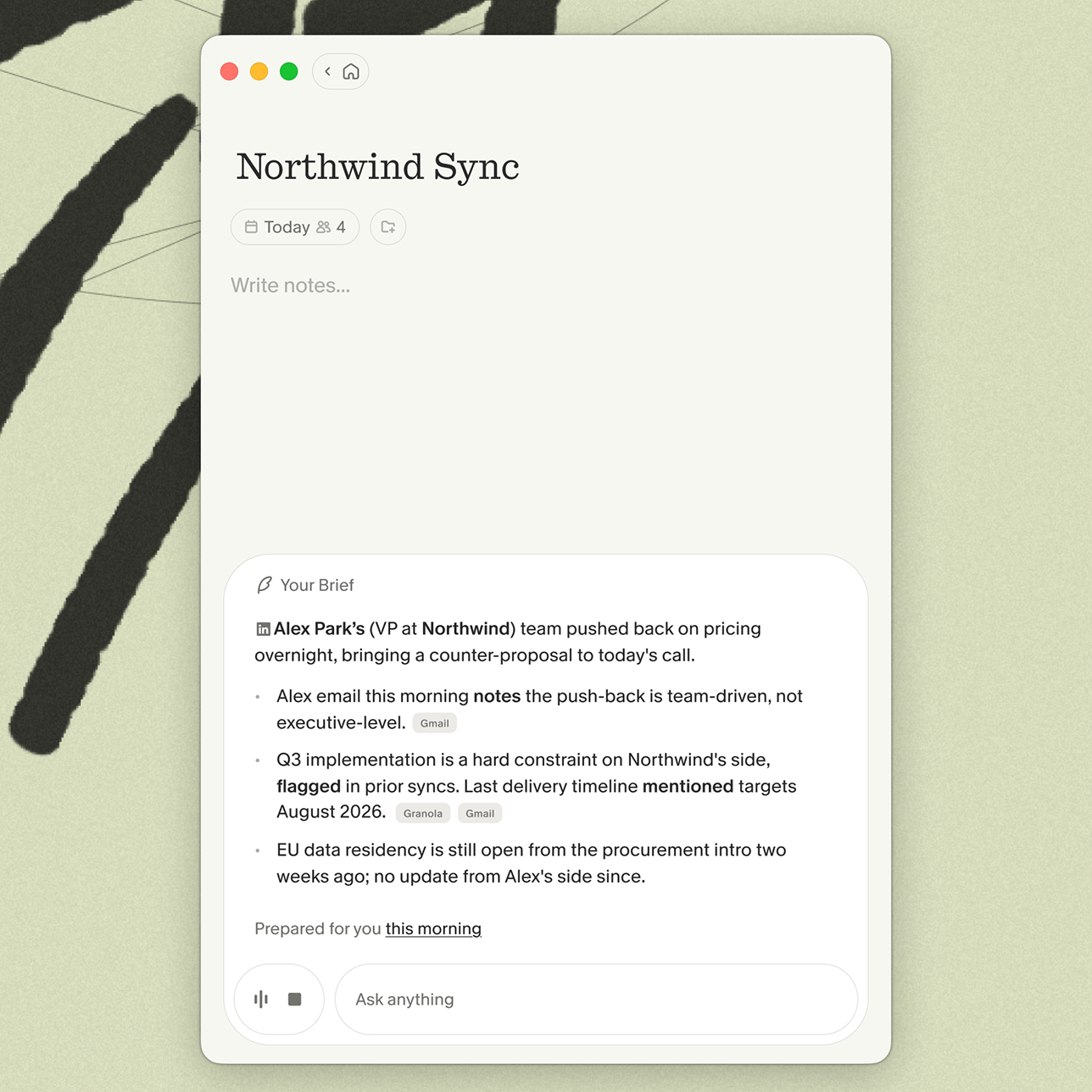
Pre-reading materials sent 24 hours before the call mean you spend meeting time deciding, not presenting. Granola's pre-meeting briefs prepare you automatically: open your note as you join and you see a short brief with open threads, relevant context, and agenda points.
How to diagnose your meeting problems
Applying the 5 P's only works once you know which meetings are worth optimizing and which should be cancelled outright. Here is a structured audit process.
Audit your calendar for patterns
Pull up the last two weeks of your calendar and score each recurring meeting using the checklist below. Be honest: a meeting that passes one or two criteria but fails the rest is a candidate for restructuring or cancellation.
The Meeting Audit Checklist
For each meeting, consider whether it meets these criteria:
- This meeting has a written outcome statement before it starts
- Every attendee has a direct role in achieving the outcome
- The agenda is shared with attendees at least 24 hours in advance
- Decisions from previous meetings are referenced at the start
- Action items are assigned to named owners with deadlines by the end
- This meeting could not be replaced by a written update or async thread
- Attendees are actively engaged rather than multitasking
- Notes or decisions are captured and accessible to the team afterward
Meetings that meet most of these criteria are well-structured. Those with multiple gaps are candidates for redesign or async replacement.
Track where decisions get lost
For any project that has stalled or repeated itself, trace the timeline backward to the last meeting where a decision should have been made. In most cases, either the decision was not made clearly, or it was made but not written down. A post-meeting recap is a simple forcing function: if writing it reveals nothing was decided, the meeting failed its purpose.
Fixing meetings that lack clear outcomes
Structure alone does not fix a meeting if the session ends without anyone knowing what happens next. These three practices close the gap between discussion and action.
Start with the decision to be made
Open every meeting by stating the specific decision that needs to be reached before the call ends. This single habit redirects the conversation from information-sharing to decision-making. Once the decision is made, the meeting is over.
End with explicit next steps
Reserve the final minutes of every call to assign owners and deadlines to each action item. Every commitment made in the meeting should exit the room as a named task attached to a specific person. If the closing is spent summarizing what was discussed rather than assigning what happens next, the meeting has not finished its job.
Stopping repetitive discussions
Recurring conversations about the same topic are almost always a symptom of undocumented decisions, not a sign that the topic needs more airtime. The fix is institutional memory, not more meetings.
Create a searchable meeting record
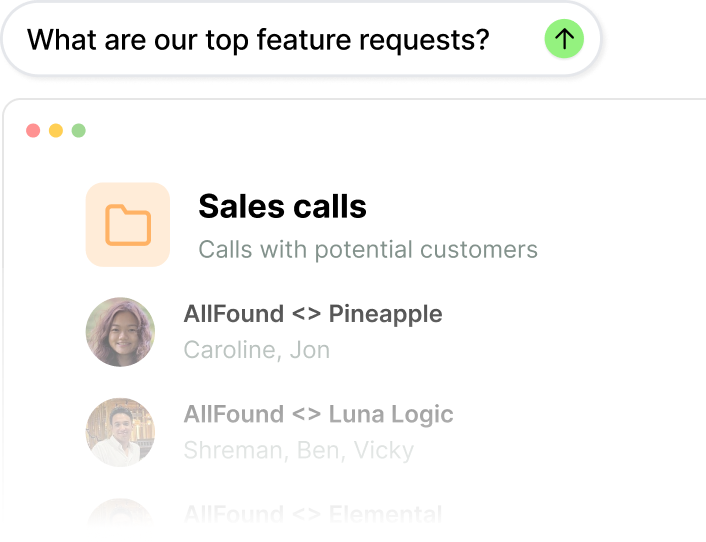
With every call in one searchable place, you can ask specific questions across months of conversations rather than relying on individual recall. Granola Chat lets you query across folders of meeting notes and surface patterns with source-linked citations. You can ask "Which UX issues came up most often in customer calls this quarter?" and get an answer drawn from every relevant conversation, rather than piecing it together from fragmented notes across three different tools.
Reference past decisions before revisiting
Before any meeting that might reopen a previous decision, pull up the notes from the last time it was discussed. Presenting the documented rationale from that conversation shifts the frame from "should we reconsider this?" to "here is what we decided and why." Granola's institutional memory features are built around exactly this workflow: People & Companies views organize all notes by the person or organization, so the full history of your interactions surfaces automatically before your next call.
Preserve context when people leave
When a founding engineer or early sales hire leaves, the conversations they participated in do not have to leave with them. A searchable archive of meeting notes means that decision rationale, customer feedback, and product context they held in their heads is accessible to whoever takes on their responsibilities. This is one of the most direct ways to protect against knowledge vacuums at a stage when there is no bench depth.
Using AI to capture what matters
The right AI notepad augments your presence in a meeting rather than taking your place in it. The distinction matters because fully automated transcription tools capture everything but prioritize nothing: the output is a generic summary shaped by the AI's defaults rather than your judgment about what was strategically important.
How Granola's AI notepad works
Granola is a notepad first. You jot rough notes during the meeting, and Granola enhances them by drawing on the full transcript to fill in the details. Write "pricing concerns" in your notes and Granola finds every pricing discussion in the transcript and adds relevant context. Leave the notepad blank and get a generic summary. Your notes stay in black and AI additions appear in gray, so you can see exactly what you wrote and what was added.
Granola captures device audio directly, which means it works with any meeting platform including Zoom, Google Meet, Teams, Slack, FaceTime, and WebEx.
Stay present while capturing decisions
Granola's transparency features let you show participants that notes are being captured without disrupting the meeting. The in-meeting notice posts a message in your meeting chat when transcription starts, keeping participants informed automatically. The Granola Watermark displays a visible indicator on your video throughout the call, so even late joiners can see that Granola is active.
On the privacy side, Granola's architecture transcribes audio in real time, then deletes it. No audio files are stored. The transcript and notes persist, but the audio is gone. Granola is SOC 2 Type 2 certified as of July 2025 and GDPR compliant, and third-party AI providers are contractually prohibited from training models on your data. If your team needs HIPAA compliance or audio playback for legal verification, those requirements fall outside what Granola offers today, and it is worth evaluating tools that specifically address them.
Query past meetings for context
Granola Chat handles everything from quick lookups ("What were the action items from last Tuesday's board call?") to pattern analysis across months of conversations ("What risks did investors mention most often in our Series B conversations?"). Every answer includes source-linked citations pointing to the specific meeting where each point was raised, so you can verify the context rather than just trusting the summary.
Shared team folders extend this further. Create a folder for Sales Calls, Customer Feedback, or Hiring Loops, and any team member with access can query across the full set. Cross-meeting intelligence turns a collection of transcripts into something that actively reduces repetitive discussions. Pedro Franceschi, Founder and CEO of Brex, described the organizational impact directly: "As we rebuild Brex into an AI-native company, we need tools that move fast without ever compromising accuracy. Granola earned our trust by delivering precise, reliable summaries, and helped strengthen our written culture."
Setup in under 5 minutes
Download the Mac or Windows app, connect your Google or Microsoft calendar, and Granola syncs automatically. You can start using it immediately with no training. The Business plan is $14 per user per month, which works out to $1.40 per meeting for a founder running 10 meetings a week. The Enterprise plan starts at $35 per user per month and adds SSO, org-wide auto-deletion controls, admin sharing permissions, and priority support.
Try Granola for free and see the difference in your next meeting.
FAQs
How do I know if a meeting is necessary?
Apply a single test: if the outcome requires real-time discussion or a live decision, the meeting is necessary. If the outcome is information transfer or status sharing, it belongs in a written update.
What if my team resists meeting changes?
Start with one recurring meeting that you own and pilot the 5 P's. Measurable improvements in that session build the case for broader adoption better than top-down mandates.
How does Granola handle participant awareness?
Granola captures device audio directly and transcribes in real time. You can enable an in-chat notification or a video watermark so participants know Granola is active, keeping everyone informed. Audio is deleted immediately after transcription and no recordings are stored.
Can I fix meetings without adding more tools?
Yes. The 5 P's framework, the Meeting Audit Checklist, and the async-first communication norms described in this guide all require process discipline rather than new software. Tools add value once the process is in place, not as a substitute for it.
Key terms
Institutional memory: The searchable record of decisions, rationale, and context from past meetings that persists beyond individual employees' tenure. Prevents knowledge vacuums when key people leave.
Human-in-the-loop: AI approach where you guide what matters by writing rough notes, and the AI enhances them from the transcript. Contrasts with fully automated summaries that prioritize everything equally.
The 5 P's: Framework for evaluating meeting effectiveness: Purpose (why you're meeting), People (who needs to attend), Process (agenda structure), Payoff (clear outcome), and Preparation (pre-shared context).
Async-first culture: Team communication norm where written updates replace status meetings, and synchronous time is reserved only for decisions that require real-time discussion.