





Best AI note takers for Zoom
July 17
TL;DR: AI note takers for Zoom differ in how they capture a call, how much control you keep over the notes, and where the output ends up. For professionals working through executive interviews, client discovery calls and other high-stakes discussions, the value is recall: staying present in the conversation and getting an accurate, structured record afterwards. Granola runs on your laptop or phone and uses your device's audio to generate notes, enhances your personal notes with transcript context, and syncs directly to your CRM. Granola, an AI notepad, does all of this at $14 per user per month on the Business plan, with a free tier available to get started today. We recommend telling other participants that you are using Granola to transcribe the call.
Standard meeting transcription tools were built for sales teams running high-volume demo calls. In executive interviews, candidate conversations, client discovery calls and confidential discussions, what you need from a note taker is different: an accurate record of what was actually said, and the freedom to stay in the conversation rather than typing through it. Summaries that flatten specifics into generalities are not enough when the detail is the whole point.
This guide explains why Granola's human-in-the-loop approach suits sensitive, high-stakes conversations, where staying present and recalling the detail afterwards matter most. We cover the factors that matter most in high-trust meeting contexts: note quality, confidentiality, and CRM integration.
Crucial features for AI note takers on Zoom
Professional meetings require judgment, and the tools you use should support your judgment, not replace it. Before comparing specific products, it helps to identify the three capabilities that separate a genuinely useful documentation tool from a generic transcription service.
High-fidelity records for downstream documentation
Post-meeting documentation requires specific, verbatim quotes, not summaries. When you write a client brief or decision log, your colleagues want specifics. They need to know exactly what was said, what the data points were, and whether the reasoning holds up. Generic output like "the participant discussed key concerns" is useless for downstream work.
Staying present in high-stakes conversations
What matters most in a candidate conversation, a confidential client call or an executive interview is your attention. Every minute spent typing is a minute you are not listening, following up on a hesitation, or pressing for the specific number. A note taker earns its place by giving that attention back to you and returning an accurate record afterwards.
Laura Kinder, President of Daversa Partners, described the impact directly: the executive search firm adopted Granola across 136 of 150 employees, giving its consultants an accurate record of CEO search conversations without having to write them up by hand.
Syncing AI notes with your CRM
Manual data entry into your CRM after a day of back-to-back meetings is a task that eats into your evening and rarely happens correctly. Context gets lost between the Zoom call and the CRM update. Team members fill in gaps from memory. When relationships transition between team members, the history in the system reflects what got typed, not what was actually discussed.
Granola's integrations guide covers how the native connections to Affinity, HubSpot, and Attio work in practice. After a meeting ends, your enhanced notes connect directly to your CRM without copy-pasting. Meeting summaries attached directly to contact profiles keep an entire team aligned on relationship status as conversations progress.
Top-rated AI note takers for Zoom meetings
Note taking for sensitive conversations
Sensitive conversations generate impressions that should never live in a shared document. A note might read something like: "Client hesitated when discussing their timeline," "Contact gave a more guarded answer than expected on the budget question," or "Stakeholder was uncertain about their internal sign-off process." These are the raw notes that inform decisions, and they need a private space before they inform a structured report.
Granola gives you a notepad of your own alongside the call. Your notes are black text. AI additions from the transcript appear in gray when you enhance after the call. You choose what stays, what gets deleted, and what moves into a shared folder for your team. That control matters when you are capturing candid impressions about people or organizations you are still evaluating.
Confidential AI notepad for Zoom
Granola runs on your laptop or phone and uses your device's audio to generate notes. The interface works as a clean, Apple Notes-style notepad that sits alongside your video call, and you type only what matters while Granola transcribes in real time. We recommend telling the other participants that you are using Granola to transcribe the call.
After the meeting, you click enhance, and the AI uses your typed notes as a guide to structure the transcript into sections.
How device-level capture works
Bot-free transcription refers to a specific technical approach: capturing audio at the system level on your device rather than routing it through a meeting platform integration. Because capture does not depend on a platform integration, the same setup works across every application you take calls in.
Why executive search teams use Granola
Executive search teams are a useful example. The Daversa Partners adoption story shows what an accurate, low-effort record is worth in that work.
Executive search for CEO-level roles involves long, detailed conversations about internal conflicts, executive performance and succession dynamics. Consultants need to recall that detail accurately weeks later, and they need to be listening rather than typing while it is said. That is the work Daversa Partners adopted Granola for, across 136 of 150 employees.
The same logic applies to any conversation where the detail matters weeks later. What you need is an accurate record of what was said and the attention to follow up on it in the moment. That combination is what shapes better decisions afterwards.
Audio handling and retention
Granola captures device audio and transcribes in real time, then deletes the audio. No recordings are stored. You cannot replay the audio after the call ends. This is a deliberate trade-off: You get the transcript and AI-enhanced notes, but not the ability to re-listen to the conversation.
The Granola security page details how this design choice affected the SOC 2 audit scope.
Limitations of manual note taking
Manual note-taking forces a binary choice: You are either writing or you are listening. In a 30-minute one-on-one call, the moments that matter are often the unscripted ones: the hesitation when you probe a difficult topic, the shift in energy when someone describes a challenge, the precision or lack of it when specifics are pressed. You miss those moments when you are looking at your keyboard.
Granola resolves this: You jot only what matters during the meeting, staying present for the conversation, and the AI fills in the supporting context from the transcript after the call ends. Your notes in black. AI additions in gray. The final document reflects your priorities because you set them during the meeting, not an algorithm guessing at what was important.
Evaluating transcription quality for Zoom meetings
Transcription quality in professional contexts means more than spelling words correctly. It means capturing specific numbers, preserving the distinction between "we plan to reach profitability" and "we reached profitability last quarter," and handling the domain-specific terminology that appears in specialized professional conversations.
Assessing AI transcription reliability
Clean audio environments produce reliable transcripts. The main variables that affect quality across all tools in this category are microphone quality, speaker overlap in group calls, and the presence of domain-specific terminology. For one-on-one Zoom calls with a single speaker, the transcript will accurately capture what was said. Multi-speaker calls with significant crosstalk are harder for any tool to handle cleanly.
Interpreting nuance in high-stakes calls
Important decisions hinge on nuance that automated summaries compress or erase. Consider the difference between a participant who says "we have 12 active contracts in the pipeline" and one who says "we're in conversations with a few prospects." Those two answers are not interchangeable. One signals traction. The other signals hope. A generic summary that reports "participant discussed pipeline" loses the distinction entirely.
Human-in-the-loop enhancement preserves that distinction because you flag it during the meeting. If you type "pipeline specifics" as a note, Granola finds the exact exchange in the transcript and presents it in context. Your judgment about what to surface drives what the AI surfaces.
Evaluating AI note taker performance
The practical test for any AI note taker is straightforward: Run a test call, type minimal notes, click enhance, and evaluate whether the output would support your downstream documentation needs. Look specifically at how the tool handles technical metrics, named entities, and any moments where the speaker revised a claim mid-conversation. Then run the same call with detailed typed notes and compare the two outputs. The gap between those two versions tells you how much the human-in-the-loop guidance is actually changing the final documentation.
AI notepad options for non-Zoom environments
Professional conversations do not stay on Zoom. Client check-ins happen on Google Meet, team conversations on Slack huddles. Informal calls happen on FaceTime. A documentation tool that only works inside Zoom leaves a significant portion of your conversations unrecorded.
Syncing notes with your existing tools
Because Granola captures system-level audio from your device, it works across any meeting platform you can attend: Zoom, Google Meet, Microsoft Teams, Slack huddles, FaceTime, WhatsApp, and others. The Granola app does not need an integration with the platform to transcribe the conversation. It listens to what your device hears and produces a transcript regardless of which application is running. You can also use it to capture notes on podcasts or video content you are reviewing for reference or research.
Connecting your notes to Zapier
Granola's integration with Zapier connects your meeting notes to over 8,000 applications through Zapier's automation layer, available on the Business plan. For professional teams, the practical applications include creating Asana action items from meeting outputs, updating Google Sheets tracking databases, and pushing notes into tools that do not have a native Granola integration. The Zapier documentation covers the setup process and available triggers.
Syncing notes to Affinity CRM
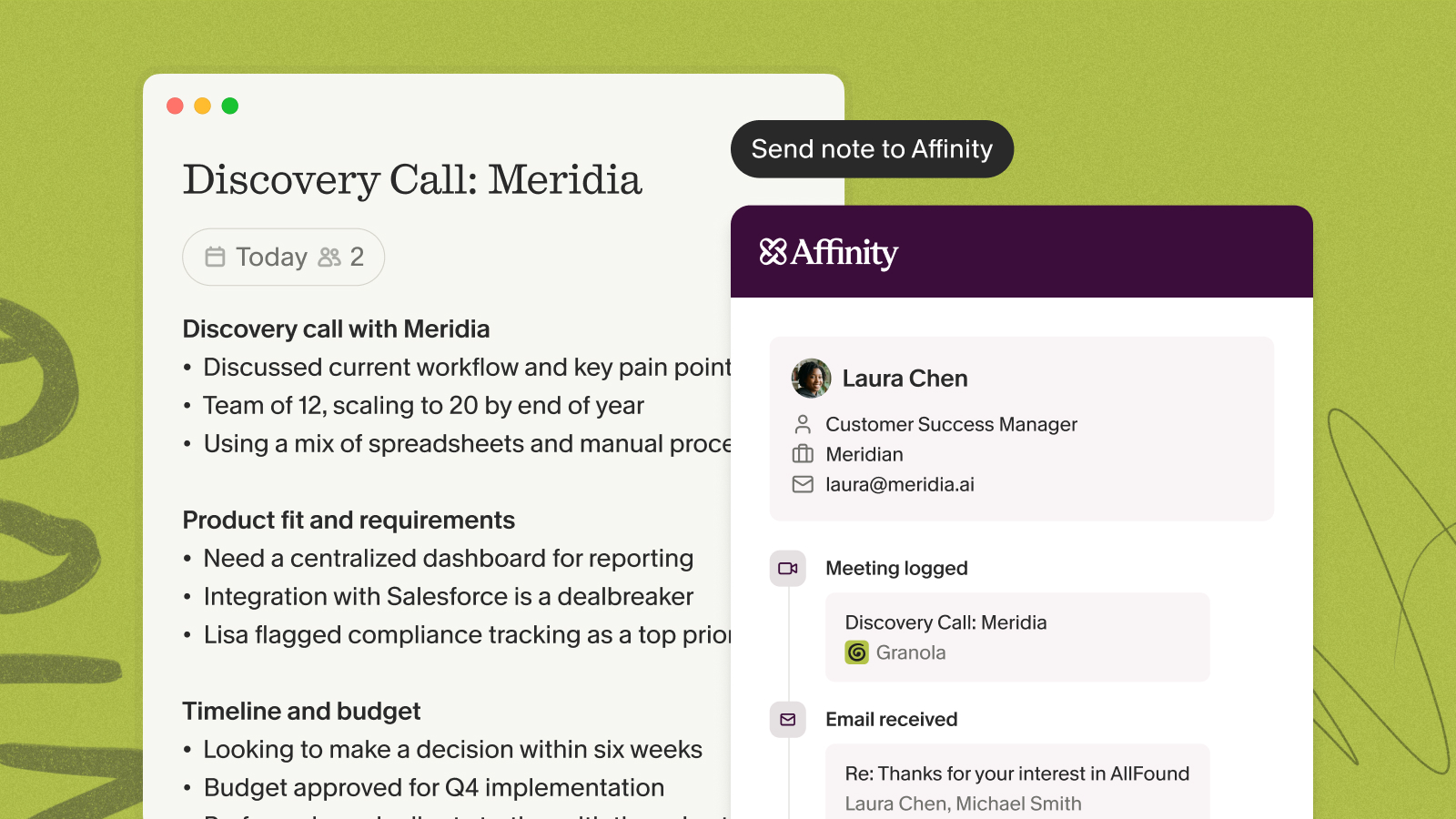
Affinity is a relationship intelligence CRM used by teams that manage high-volume, relationship-driven pipelines. The Granola integration with Affinity connects your enhanced meeting notes directly to your CRM, eliminating the manual update that typically happens inconsistently or not at all at the end of a heavy meeting day.
For professionals who manage relationships across a large pipeline, this creates a searchable record of every conversation attached to the right contact entry. When you need to reconstruct what was said three weeks ago before a follow-up meeting, the notes are already in your CRM next to the contact's profile. That context does not live in someone's head or a personal notes folder.
The strategic case for independent AI note takers
Zoom's built-in AI features require no additional installation. For many teams, that convenience is the default choice. But convenience and capability are different things.
Zoom Workplace AI and ZoomMate
As of June 2026, Zoom retired the AI Companion name. Basic meeting summaries and transcription are now built directly into Zoom Workplace at no additional cost. Zoom also launched ZoomMate ($20 per user per month), a more capable agentic product that goes further: It can update CRM records, execute workflows across connected tools, and retain preferences and project context across sessions. For internal team standups or administrative calls where the summary does not need to drive downstream decision-making, the built-in Zoom Workplace features work adequately.
The differentiation case for an independent tool like Granola is no longer about whether Zoom can touch a CRM or remember context. ZoomMate can do both. The case is about output and reach: Granola gives you a notepad you steer during the meeting, an enhanced document afterwards that follows your priorities, and the same workflow across every platform your conversations happen on.
Granola runs on your laptop or phone and uses your device's audio to generate notes, so the same workflow follows you across every platform your conversations actually happen on. You can also find more detail on how to get a Zoom meeting transcript through native and third-party methods.
Scaling your AI notepad for Zoom
An independent tool builds institutional memory that survives the platform you happen to be using today and the team members who leave next year. As you capture more meetings in Granola, the folder-level query function lets you search across all of them simultaneously. Ask "What objections came up most often across client calls this quarter?" and Granola searches every relevant meeting, finds patterns, and cites specific conversations with source links.
Running Zoom Workplace and Granola side by side
Some firms find a practical division of purpose: Zoom Workplace's built-in AI handles internal administrative meetings, while an independent AI notepad like Granola handles external client-facing conversations. This gives the team a consistent, structured archive of those conversations in one system while keeping internal overhead low. Granola was designed to integrate into an existing workflow rather than replace it.
"Granola nails exactly what I need: clean, reliable meeting transcripts and smart follow-up summaries without any fluff. I use it for nearly every call to stay focused on the conversation instead of scribbling notes." - Verified user on G2
Try Granola for free. Download the Mac, Windows, iOS, or Android app, connect your calendar, and run your next meeting to see enhanced notes in under five minutes.
FAQs
Does Granola store my meeting audio?
No. Granola transcribes audio in real time and deletes the audio file immediately after the meeting ends. Only the transcript and your enhanced notes persist, and Granola retains no audio on any server.
Can participants tell that Granola is active during a call?
You can show a watermark on your video while transcribing, so everyone in the meeting knows Granola is active.
How does Granola's meeting data meet SOC 2 criteria?
Granola achieved SOC 2 Type 2 certification in July 2025 by transcribing audio in real-time and deleting the audio files immediately after each session. No recordings are stored, and third-party AI models are contractually prohibited from training on your data.
Key terms glossary
Bot-free transcription: A method of capturing meeting audio directly from a device's system audio rather than through a meeting platform integration. Because it does not rely on a platform integration, the same setup works across any application you take calls in.
Human-in-the-loop enhancement: An AI note-taking process where the user's typed notes guide the AI, ensuring the final documentation reflects human priorities. If you type "pricing concerns," the AI surfaces every pricing discussion from the transcript into that section rather than generating a generic summary.
Folder-level query: An agentic search function that allows users to ask questions across multiple meeting transcripts simultaneously, returning cited, source-linked answers. For example: "What recurring concerns did clients raise across discovery calls this quarter?" returns specific quotes from every relevant conversation in the folder.