





How to extract feature requests from customer feedback with an AI notetaker
February 12
Granola lets you jot rough notes during calls and turns them into a full write-up afterwards, using your device's audio to generate the transcript. Let the other participants know you're using Granola to transcribe the call.
If you're responsible for conducting customer interviews, then you know how tedious feedback collection can be. Each call surfaces feature requests, workarounds, and complaints. Some get captured in notes but most die in the gaps between what customers say and what you manage to type. Then comes the synthesis bottleneck: turning scattered notes into structured feature requests that inform roadmap decisions—and get accepted by the product team!
Collecting and analyzing customer feedback pulls time away from critical product work, creating a synthesis bottleneck that doesn't scale past a handful of weekly interviews. The painful choice becomes clear: either drown in unstructured notes or make decisions based on incomplete data.
This guide shows you how to extract feature requests from customer conversations by using an AI notetaker (or AI notepad as we like to say) such as Granola. You'll learn frameworks for identifying actionable requests during calls, automation workflows that structure feedback without heavy research repositories, and query techniques that surface patterns across conversations. The goal is moving from anecdotal evidence to data-backed confidence about what to build next.
Why manual feedback analysis fails at scale
Manual tagging of customer interviews breaks down as volume increases. You start with good intentions: open the transcript, highlight key quotes, categorize by theme, add tags for product area. Two hours later you've processed one interview and have seven more waiting.
Time cost compounds weekly: Traditional synthesis burns 2-3 hours per interview before you've extracted a single actionable insight. That time prevents you from running additional interviews or making roadmap decisions.
Human memory introduces bias: Recency bias means giving more weight to recent events when making decisions or forming opinions. You remember yesterday's API limit complaint more vividly than last month's pattern of five customers mentioning dashboard customization. Your roadmap reflects what's fresh in your mind rather than what appeared most frequently.
Consistency breaks down: Your taxonomy changes as you learn. Interview three introduces categories that should have captured patterns from earlier conversations. Now you must reprocess old notes or accept inconsistent analysis across your research.
Scattered documentation makes synthesis harder. Research lives in Notion pages, Google Docs, Slack threads, and your memory. When stakeholders ask "How many customers mentioned SSO?" you can't answer with confidence because finding past findings requires manual review of dozens of documents.
Distinguishing genuine feature requests from general complaints
Not every customer statement constitutes an actionable feature request.
- Past behavior reveals real needs. "I would totally use bulk editing" is speculation about hypothetical behavior. "I currently export to Excel, edit there, then re-import because I need to update 200 records" is evidence of genuine pain backed by workaround behavior. Ask about past behavior, not future intentions.
- Workarounds signal intensity. A casual wish sounds like "Slack notifications would be nice." A genuine need sounds like "We built a Zapier integration that polls your API every 15 minutes because our team misses critical updates otherwise." Pay attention to what customers do rather than what they say.
- Commitment demonstrates seriousness. Ask for specific commitment as a next step. "I'd pay for that" means nothing. "I'll introduce you to our VP of Engineering to discuss requirements" means something.
Training AI to apply these distinctions requires explicit instructions in your recipe prompts. Define requests as statements including past workaround behavior, cost quantification, or commitment signals. A generic "extract feature requests" prompt returns vague wishes. Specific prompts requiring evidence filter for genuine needs.
Capture high-fidelity conversation data
Good synthesis starts with good capture. Accurate notes and a full transcript mean you can stay in the conversation, ask better follow-up questions, and rely on the record afterwards rather than on memory.
Granola runs on your laptop or phone and uses your device's audio to generate notes. You can tell participants at the start of the call that you're using Granola to transcribe, then focus on the conversation while the transcript and your rough notes build up for later.
Granola transcribes in real-time and the audio is deleted afterwards, so what you keep is the transcript and your notes rather than a recording. Granola'stranscription happens in real-time, then audio is deleted. No audio recordings are retained.
Tell participants you're using Granola to transcribe the call. A short line at the start — that you're using an AI note-taking tool so you can capture the discussion accurately — is all it takes, and it keeps everyone clear on how the conversation is being recorded.
Manual notes create hours of synthesis work and inconsistent structure. Granola runs on your laptop or phone and uses your device's audio to generate notes, so you get a full transcript plus fast, structured synthesis through custom recipes — and you can tell participants at the top of the call that you're using it.
"What I like best about Granola is how effortlessly it handles meeting notes without disrupting the flow of the conversation. It listens directly from my device audio no bots joining calls and produces clean, structured summaries with decisions, action items, and key points." - Brahmatheja Reddy M. on G2
Automate extraction with AI recipes and templates
Recipes are saved prompts written by experts that work with your meeting notes, combining powerful AI prompts with conversation nuance.
Set up a custom feature extraction recipe:
- Access recipes. Type forward slash (/) in the floating chat bar to display all available recipes including defaults, custom ones you've created, and team-shared options.
- Write your extraction prompt. Writing recipes is an iterative process. Start with: "Extract all feature requests mentioned. For each: (1) exact customer quote, (2) product area affected, (3) whether they described a workaround, (4) any quantified impact mentioned."
- Add definitional context. Think of the AI as an intern who needs specifics. Define what constitutes a feature request: "Include explicit asks for new functionality, descriptions of manual workarounds, or comparisons to competitor features. Exclude bug complaints or vague statements without specifics."
- Test and refine. Click 'preview' to run it on a single meeting, then edit and regenerate. If the AI captures too many vague wishes, add: "Only include requests where the customer described past behavior or workarounds."
- Apply to notes. Wait for your meeting to end, then click Enhance notes. The AI processes your rough notes and transcript through your custom recipe, returning structured, categorized requests.
Prompt specificity determines extraction quality. "List feature requests" returns vague wishes. One Granola Recipe analyzes customer calls to extract product feedback and group it into actionable themes, transforming hour-long interviews into categorized documents.
Your rough notes guide AI focus. If you jot "Pricing concerns" when that topic arises, enhancement prioritizes pricing-related requests. The AI fills in context you missed, but you control what matters.
"Granola nails exactly what I need: clean, reliable meeting transcripts and smart follow-up summaries without any fluff. I use it for nearly every call to stay focused on the conversation instead of scribbling notes." - Verified user on G2
Synthesize patterns across multiple feedback sources
Individual interview notes capture what one customer said. Roadmap decisions require understanding patterns across dozens of conversations. Granola's folder-level queries transform isolated documents into a searchable research repository.
Create a synthesis workflow:
- Organize interviews into folders. Create folders named "Q1 Customer Discovery" or "Enterprise Feature Requests" and move relevant meeting notes in. The folder becomes a queryable collection.
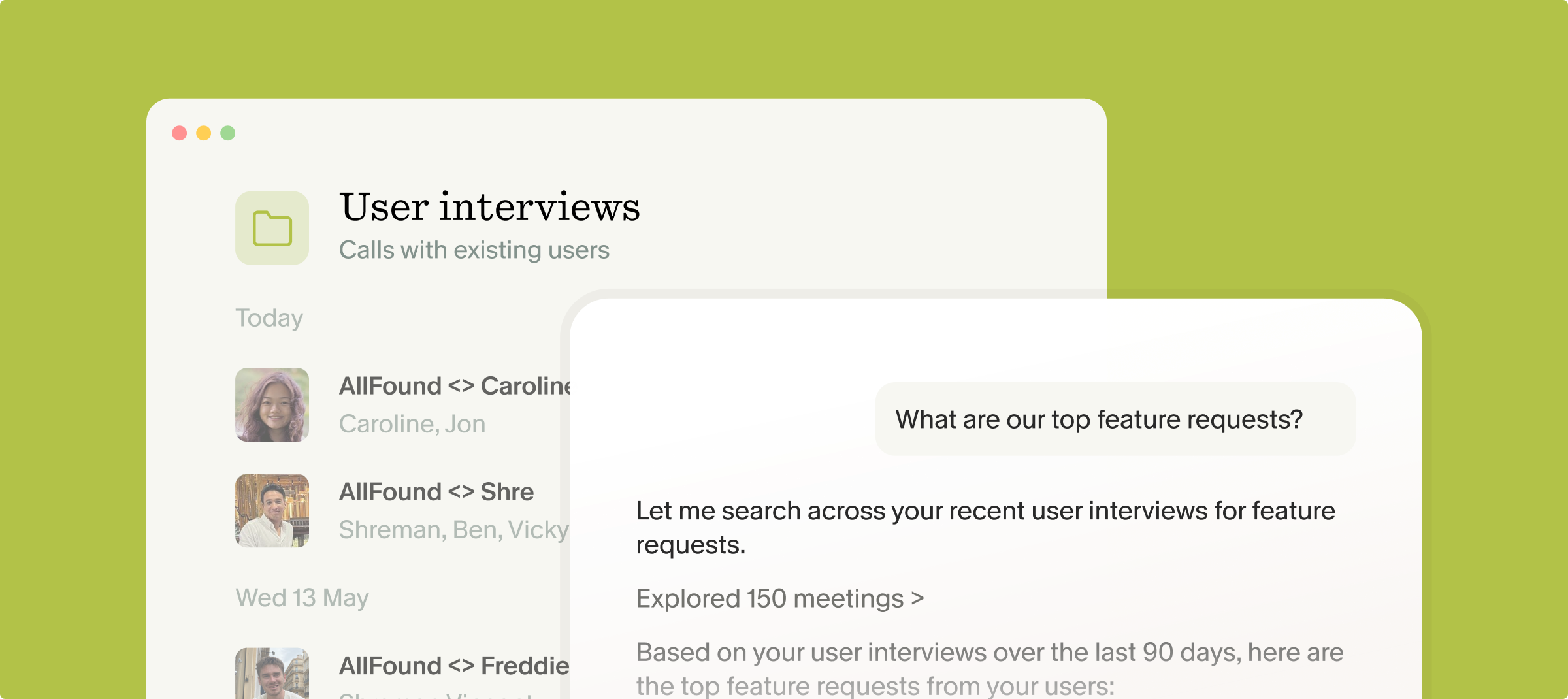
- Query across the collection. Ask questions like "What were the most common feature requests from Q1 customer calls?" Granola scans all folder notes to surface patterns with context and citations.
- Review cited responses. When you ask "Which features were most requested this quarter?" Granola delivers insight reports showing which interviews mentioned each request with source links.
- Use multiple meeting recipes. Multiple meeting recipes work across collections for broader analysis like identifying patterns across your team's meetings or updating personas based on recent calls.
The synthesis capability solves research debt where accumulated insights become unfindable. Instead of manually reviewing ten transcripts to count API rate limit mentions, you ask the folder and receive an instant answer with citations.
Cross-meeting patterns reveal priority signals individual conversations hide. One customer requesting bulk editing could be an outlier. Seven customers independently describing Excel export workarounds signals a genuine product gap.
Shared folders enable team collaboration without duplication. When you move five enterprise sales calls into a shared "Enterprise Pain Points" folder, your engineering lead can query "What technical concerns do enterprise buyers mention?" without asking you to summarize.
"It's simply the easiest tool I've discovered for capturing notes during meetings. Granola is the one tool I continuously have up during my day whether in a meeting or going back to 'ask questions' about what happened during the meeting." - Andy C. on G2
Turn frequency data into roadmap prioritization
Structured extraction and cross-meeting synthesis produce quantitative data about qualitative conversations. A feature mentioned in seven of ten enterprise calls carries more weight than something mentioned once. Granola integrates with tools you already use to move intelligence from notes into roadmap systems.
Connect to your roadmap workflow:
- Export to Notion for documentation. Connect to Notion through your settings. Create a "Feature Requests" database aggregating requests from all customer interviews with fields for frequency, customer segment, and priority.
- Automate ticket creation. Use Zapier to connect with thousands of tools. Set up triggers where "Note Added to Granola Folder" creates issues in Linear or Jira with feature requests as titles and customer quotes as descriptions.
- Maintain customer context. Automatically match notes with the right people, company or deal records in Attio, HubSpot, or Affinity. When customers mention requests, that context syncs to their account records.
- Share synthesis summaries. Pick a Slack channel to post Granola links to. After running folder queries that surface top requests, post summaries to your product team channel.
The integration approach turns conversation insights into actionable tickets without manual copy-paste work. Quantifying request frequency addresses the stakeholder challenge where qualitative findings get dismissed as anecdotal. Saying 'customers want bulk editing' carries less weight than 'bulk editing appeared frequently in enterprise discovery calls, with multiple customers describing Excel export workarounds.'
Citation capability matters during roadmap debates. When engineering questions whether a feature is worth the effort, you pull up customer quotes where they quantified time spent on manual workarounds. The conversation shifts from "Is this real?" to "How do we solve this?"
"I love that you can blend shorthand with AI notes. It's also super intuitive and super easy to use. I use this nearly every day for work." - Mason K. on G2
How Granola automates feature request tracking
The complete workflow removes the synthesis bottleneck between customer conversations and roadmap decisions. Granola is an AI notepad that runs on your laptop or phone and uses your device's audio to generate notes, structures requests with custom recipes, and surfaces patterns across conversations.
The automation sequence:
Capture: Granola runs on your laptop or phone and uses your device's audio to generate notes. Let participants know you're using it to transcribe, then jot rough notes during the conversation and stay present instead of typing furiously.
Extract: Custom recipes process your notes and transcript through prompts you define. Your "Feature Request Extraction" recipe identifies genuine requests, categorizes by product area, and structures output consistently.
Synthesize: Folder-level queries span multiple conversations to find patterns. You ask "Which integrations do customers request most often?" and receive answers citing specific interviews.
Integrate: Zapier workflows and direct integrations push structured requests into Linear, Notion, or your CRM automatically.
Our product philosophy centers on human augmentation rather than full automation. You control what gets captured, how requests are categorized, and which patterns matter. The AI structures output, but you remain the decision-maker.
This addresses the core fear: building the wrong thing. When roadmap decisions connect directly to structured customer feedback with full citations, you build with confidence. The institutional memory persists even when team members leave, because research lives in a queryable system rather than in people's heads.
"With Granola I don't have to worry anymore about taking meeting notes, I can just write down things I really care about and let Granola take care of the rest. we can all chat with the meeting transcript so everyone can see the full context of the meeting, even if they weren't there." - G2 user review
Want to test this workflow? Download Granola, connect your calendar, and set up a feature extraction Recipe for your next customer interview. See how synthesis time shifts from hours to minutes.
Frequently asked questions about extracting feature requests
How should I tell participants I'm using Granola?
Verbally state at the beginning: "I'm using an AI note-takingtool to help me capture our discussion accurately. Is everyone okay with that?" Say it plainly at the start of every call — telling participants you're using Granola to transcribe is the practice we recommend.
Can AI accurately distinguish between bug reports and feature requests?
AI accuracy depends on prompt specificity. Think of the AI as an intern who needs explicit definitions. Include clear criteria: "A feature request suggests new functionality. A bug report describes broken existing functionality." Then test using preview and add rules to guard against failures.
How does this compare to research repositories like Dovetail?
Dovetail provides powerful centralized repositories but requires significant manual tagging and taxonomy maintenance. Granola automates extraction through recipes while keeping you in the loop, providing meeting-specific automation that structures feedback without requiring extensive manual tagging.
What if I need audio playback for verification?
Granola processes transcripts only and deletes audio immediately. This architectural choice trades playback for privacy and faster compliance. If your legal team requires audio verification, traditional recording tools serve that need.
How accurate is transcription for technical product conversations?
Transcription quality depends on audio conditions and terminology. You can customize transcription by adding custom vocabulary for product-specific terms.
Key terminology
Synthesis: Turning raw interview transcripts and scattered notes into structured insights and patterns. Takes hours when done manually, becomes automated when you use AI recipes with clear extraction prompts.
Recency bias: The tendency to give more weight to recent events when making decisions. In product management, this causes roadmaps to reflect what you heard yesterday rather than patterns from the last quarter.
Device audio capture: A method that generates notes from the audio playing on your laptop or phone rather than joining the meeting as a participant.
Recipe: A saved prompt that processes meeting content in specific ways. Recipes automate extraction of feature requests, coaching feedback, or other structured outputs from conversational transcripts.
Folder-level query: The ability to ask questions across multiple meeting transcripts simultaneously. Enables finding patterns like "Which features appeared most often?" with cited sources from specific conversations.