





Discovery call notes template: Capture pain, stakeholders, and next steps in one page
June 5
TL;DR: Most discovery call templates fail because they're too long to fill out live and too generic to surface real pain. A one-page format built around six fields (current state, pain quantification, stakeholder map, success criteria, timeline, and next steps) keeps the conversation diagnostic rather than interrogative. Pair that structure with an AI notepad like Granola, and you capture the context you typed about plus the supporting detail from the transcript while staying focused on the prospect. Your rough notes guide the AI, Granola enhances each field with transcript context, and the result syncs directly to HubSpot after the call.
Most reps obsess over their pitch while the pipeline stalls because discovery documentation is broken. Successful discovery calls tend to involve a focused set of targeted questions, yet bloated templates force reps to track dozens of fields. That turns a diagnostic conversation into an interrogation and buries the nuanced insights that decide deals.
The fix isn't a better script. It's a tighter structure: Six fields and a tool that captures the context you care about without interrupting the conversation to do it.
What makes a discovery call note that moves deals
One of the most damaging mistakes in discovery is letting the call drift from conversation to presentation. Presentations deliver information. Discovery exchanges it. The moment you start working through a multi-page checklist, you've made the call about your process, not the prospect's problem.
Why most templates fail
Bloated templates create two failure modes. First, they force reps to focus on filling fields rather than listening, which produces surface-level answers instead of real diagnostic insight. Second, reps who lean heavily on domain expertise can drift toward presenting before they've fully understood the buyer's situation.
The SPICED framework from Winning by Design addresses this directly. SPICED stands for Situation, Pain, Impact, Critical Event, and Decision. It gives you a diagnostic spine for discovery without locking you into a rigid sequence. Each letter maps to a question category, not a script, and that's the distinction: A framework guides your thinking, while a long template governs your behavior.
The six fields that matter
A one-page discovery template should contain exactly these fields:
- Current state: What their world looks like today (the tools, the process, the friction).
- Pain quantification: The specific cost of the problem in time, revenue, or headcount.
- Stakeholder map: Who is involved, who has authority, and who champions the deal internally.
- Success criteria: What a win looks like for the prospect six months after implementation.
- Timeline and urgency: The deadline or compelling event that creates pressure to decide.
- Next step commitment: The specific action both parties agree to before the call ends.
Every field ties directly to a question you ask live. If you can't map a field to a question, it doesn't belong in the template.
One page vs. three-page formats
A three-page template implies everything is equally important, which means nothing is. A one-page format forces you to decide in advance what actually moves the deal. The practical difference shows up during the call itself.
| One-page template |
Three-page template |
|
|---|---|---|
| Live usability | Easier to reference during conversation | May require post-call completion |
| Rep focus | More listening bandwidth | More field tracking |
| Output | Focused on key qualifiers | More comprehensive detail |
| CRM sync | Faster to input | More data to process |
The one-page discovery template
Use this structure as your master format. The fields are designed to work in any order because discovery calls rarely follow a linear path.
Current state snapshot
Capture the prospect's existing setup before you talk about solutions. In B2B SaaS, this includes the tools they use, the manual processes that create friction, and the trigger that made them take this call.
Illustrative example: "Using HubSpot and Google Sheets for lead scoring. Manual process is eating significant rep time weekly. Trigger: new VP Sales joining and benchmarking current stack."
Pain quantification
Move past vague frustration toward specific costs. The goal is a number: hours lost weekly, deals slipped last quarter, or headcount consumed by manual work. Within this field, document both the direct cost and the cost of inaction. If the prospect can't articulate what happens if they do nothing, urgency is weak and timeline will slip.
Illustrative example: "Unqualified leads slipping through pipeline. Reps spending significant time on manual qualification instead of active selling."
Stakeholder map
Document every name that touches the decision, their role in the buying process, and their relationship to the deal. The stakeholder map is where most discovery notes break down: reps capture the champion's name but miss the blocker's concerns entirely.
Illustrative example: "Champion: VP Sales. Needs CFO approval above budget threshold. IT team holds integration veto."
Success criteria
Ask the prospect to describe what a successful outcome looks like six months post-implementation. Their answer reveals whether they're a serious buyer or exploring options, and it gives you the language to use in your follow-up and proposal.
Illustrative example: "Sales team consistently hitting quota. Reps spending the majority of their day on active selling rather than admin."
Timeline and urgency
Document the compelling event that creates a real deadline. A compelling event is a time-sensitive response to an internal or external business pressure with consequences if the prospect does nothing: a product launch or a competitor contract renewal. Note that your own quarter-end is seller-centric and won't create urgency for the prospect.
Illustrative example: "Budget decision in Q3. Implementation needed to impact Q4 pipeline. Current tool contract renewal approaching."
Next step commitment
This is the most important field because it's where qualification happens. Three signals tell you to disqualify early: no ICP alignment, no real urgency or trigger, and a budget ceiling incompatible with your floor. If the prospect won't commit to a specific next step with a date, document that too. It tells you more than anything else they said on the call.
Illustrative example: "Send ROI analysis by end of week. Stakeholder alignment call scheduled within five business days. CFO intro to follow."
The stakeholder map: Who matters, who blocks, who champions
B2B buying committees are larger than most reps account for. Industry research suggests that the average B2B buying decision involves 5 to 10 stakeholders, depending on company size and deal complexity. Most reps document the person they're talking to and assume that's enough. It isn't.
Economic buyer vs. champion
The economic buyer holds final authority. They can say yes when everyone else says no, and no when everyone else says yes. They care about cost, time to value, and their team's confidence in the initiative. They're often not in the first discovery call.
The champion is your internal advocate: The person with personal motivation to see the deal succeed and access to the economic buyer. Without a champion who has credibility inside the organization, qualified deals stall regardless of product quality, as the MEDDPICC sales methodology documents consistently. In your stakeholder map field, document both. If you've only identified one, your next step should be to find the other.
Identifying blockers early
Blockers surface in specific ways during discovery. Listen for: "we'd need to get IT involved" or "the CFO has final say on anything over X." Each phrase maps to a stakeholder who can slow or kill the deal if you don't engage them proactively.
Document blockers with their specific concern. "IT team: integration veto" is more useful than "IT involved." The specific concern tells you what objection to pre-empt in your proposal.
Mapping influence and authority
Your stakeholder map should capture four things for each name:
- Their role in the buying process (decision, influence, veto, or information)
- Their relationship to the champion
- Their primary concern or success metric
- Your next action to engage them
If you leave the discovery call without this map partially filled in, ask your champion one question before closing the meeting: "Who else should I include in the next conversation?"
Pain quantification: Turning complaints into dollar amounts
Surface-level pain won't move a deal past the first call. Pavilion's research on quantified pain statements shows that converting vague pain into a specific number is what allows sellers to communicate solution value throughout the rest of the sales cycle.
From "annoying" to "costs us X per year"
The transition from complaint to cost follows a simple pattern: surface the time cost first, then convert it to revenue impact. Here's a hypothetical example of how that exchange looks:
Successful reps start with time cost, then convert to revenue impact. Surface how many hours the current process consumes weekly, then tie that to what those hours could produce instead. If a rep identifies significant time lost to manual work and the average deal is $40,000 to $50,000, that time gap becomes a specific revenue number the team could be capturing. Write that number in the pain quantification field.
That exchange turns "budget constraints" into a specific, documented number. Write that number in the pain quantification field.
Documenting opportunity cost
Opportunity cost is what the prospect loses by doing nothing. After surfacing hard costs, ask: "If you could cut that cycle time in half, what would that free up?" and "How many additional customers could your team pursue if those hours were reclaimed?"
Document both the hard cost and the opportunity cost in your template. Together, they build the business case the economic buyer needs to approve the deal.
How to customize for your process
The six-field structure adapts to different roles without changing its core logic:
- Early-stage teams: Some founding teams weight the stakeholder map more heavily than other fields. At Seed stage, the economic buyer and primary contact are often the same person, so success criteria in those deals tends to capture personal stake alongside business outcome.
- Product orgs running customer research: Some teams swap "next step commitment" for "synthesis theme," shifting the goal from deal qualification to pattern recognition across calls. Granola's folder-level chat queries support this by surfacing answers like "What UX issues come up most often?" across every research call at once.
- Executive search firms: Some teams replace pain quantification with a "talent gap description" field and adjust the timeline field to capture hiring urgency. In these conversations, accurate recall of what each candidate and client said is what matters most, so the notes need to be complete and easy to review afterwards.
How Granola enhances your discovery notes after the call
Manual note-taking during discovery forces a trade-off: You're either present in the conversation or documenting it.
Granola removes the trade-off by letting you jot rough notes that guide what the AI enhances with transcript context.
How live capture works
Granola captures device audio and transcribes in real time, then discards the audio after transcription. No audio files are stored anywhere. During the call, you jot rough notes in the Granola notepad (anything from "pricing concern" to "IT is a blocker"). When the call ends, you click "Enhance notes," your notes stay visible, AI additions appear in gray, and you review or edit before sharing.
The custom templates feature lets you pre-load your six-field discovery structure. Granola enhances each field using the transcript context your notes point to. Write "stakeholder map" in your notes, and Granola surfaces every mention of decision-makers from the transcript under that field.
"What I like best about Granola is how effortlessly it handles meeting notes without disrupting the flow of the conversation. It listens directly from my device audio no bots joining calls and produces clean, structured summaries with decisions, action items, and key points." - Brahmatheja Reddy M. on G2
Works alongside your existing call setup
Granola runs on your laptop or phone and uses your device's audio to generate notes. Whichever tool you use, tell the other participants at the start of the call that you're taking AI notes.
Granola runs on your laptop or phone and uses your device's audio to generate notes, so you can stay in the discovery conversation and still have a full record of it afterwards. Tell participants at the start of the call that you're using Granola to transcribe it. This helps most in the conversations where documentation is hardest: founder pitches, executive recruiting, and any call where the prospect is walking you through detailed operational context you'll need to recall exactly.
"I recently started using the Granola AI notetaker app in my meetings, and I'm absolutely obsessed. The notes are clean and I can stay focused on the conversation." - Kristin M. on G2
Granola works with any platform: Zoom, Google Meet, Microsoft Teams, Slack, WebEx, or any other system that routes audio through your device. You can review the full integrations ecosystem on the Granola site.
From conversation to CRM
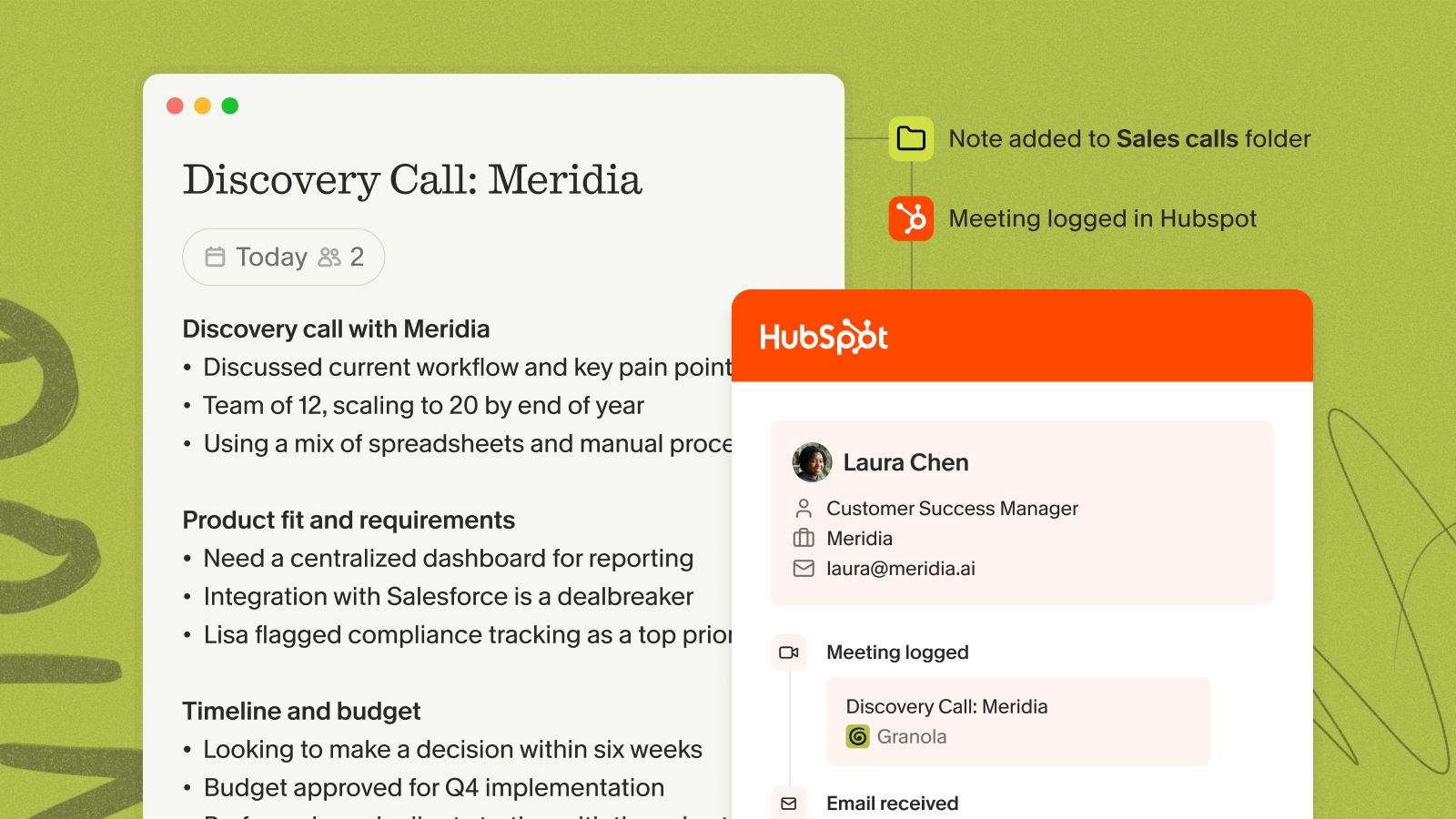
The HubSpot integration on Business and Enterprise plans pushes your enhanced discovery notes directly to HubSpot after the call. Auto folder triggering routes notes automatically when a meeting matches a pre-configured rule, and workspace scoping ties the integration to your team's Granola workspace rather than domain scoping, which keeps shared deal context visible to everyone who needs it.
For teams switching from manual documentation, the sales team adoption guide walks through a structured rollout plan. Sales managers can also use folder-level queries to surface coaching patterns across call notes.
Try Granola free. Download Granola on Mac, Windows, iOS or Android, connect your calendar, and run your next discovery call to see it in action.
FAQs
How is a discovery call template different from a sales call template?
A discovery call template focuses narrowly on diagnosis (current state, pain, stakeholders, success criteria) before any solution is mentioned. A general sales call template spans multiple stages of the sales cycle, including demo flows, objection handling, and closing language, which are distinct activities that shouldn't mix with discovery.
Should I share the discovery template with the prospect before the call?
Sharing a structured agenda can help prospects come prepared with data you'll need, like current tool costs or team headcount. Keep any shared prep document brief and focused on logistics, not the diagnostic questions you plan to ask, to preserve the conversational flow that surfaces unscripted insights.
How do I sync discovery notes to my CRM without manual entry?
Granola's HubSpot integration pushes enhanced discovery notes to HubSpot after the call. Auto folder triggering routes notes automatically when a meeting matches a pre-configured rule, eliminating the post-call admin that currently consumes a significant share of reps' non-selling hours each week.
How do I handle discovery calls where the prospect can't quantify their pain?
Start with time, not money: Ask how many hours per week the current process takes, then ask what else those hours could produce. Many prospects find time-based quantification easier to estimate from their own experience than revenue projections.
Key terms glossary
SPICED: A discovery framework from Winning by Design standing for Situation, Pain, Impact, Critical Event, and Decision. It provides a diagnostic structure for qualifying a deal without turning the call into a script.
MEDDPICC: A qualification framework standing for Metrics, Economic Buyer, Decision Criteria, Decision Process, Identify Pain, Champion, and Competition. Used to assess deal health and identify gaps in discovery. Referenced by sales teams to standardize how reps evaluate whether a deal is genuinely qualified or just active.
ICP (Ideal Customer Profile): A description of the company type most likely to buy, retain, and expand with your product, defined by firmographic attributes like industry, headcount, and revenue stage. Distinct from a buyer persona, which describes an individual. ICP alignment is one of the three disqualification signals to check before investing further in a deal.
Quantified pain statement: A specific, numeric description of what a prospect's problem costs them in time, revenue, or headcount. Replaces vague complaints ("our process is slow") with a number the economic buyer can evaluate against your solution price ("we lose approximately X hours of selling time weekly to manual qualification"). The pain quantification field in the discovery template exists specifically to capture this.