





AI notetaker for sales calls that drafts your follow-ups
February 11
TL;DR:You can't choose between speed and personalization, AI notepads solve both. Sales reps who reference specific pain points from discovery calls see higher reply rates, but capturing those details during back-to-back meetings without killing deal momentum is the challenge. Granola runs on your laptop or phone and uses your device's audio to generate notes. Jot key moments during the call, and Granola fills them out with context from the transcript afterwards. Generate personalized follow-up emails in seconds that quote prospects verbatim instead of reconstructing conversations from memory hours later.
If you're a sales rep, you know how challenging it can be to capture detailed information during discovery calls. AI notetakers for sales calls can help by capturing what prospects actually say, so you finish the call with the specifics you need rather than a half-remembered summary.
Your prospects share specific issues and pain points throughout the conversation, but without accurate notes, your follow-up emails end up lacking the specificity you need to demonstrate you were actually listening. Re-listening to full call recordings sounds like a solution, but when you're managing multiple daily meetings, who has that kind of time? The result is generic follow-ups that miss valuable opportunities to reference the specific pain points your prospects discussed during calls. The fix is better sales call note-taking software, not more admin time after the call.
The follow-up paradox: Speed vs. specificity
Fast follow-ups keep deals moving. Personalized emails improve click-through rates by 14% and conversion rates by 10% compared to generic messages. When you combine personalization with specific references to pain points discussed during your call, you prove you were listening instead of sending templates.
The problem is that no one can be specific about a conversation they don't remember accurately. Sales reps spend only 28-30% of their time actively selling. The rest goes to administrative tasks, data entry, and meeting prep. Writing personalized follow-ups from memory burns hours that should go toward closing deals.
AI notetakers solve this by capturing what prospects actually say during calls. Good AI meeting notes for sales calls give you the speed of automation with the specificity of verbatim quotes. Tools that capture device audio work in the background so you can stay present during conversations instead of typing frantically.
Why generic "checking in" emails fail
When you send generic follow-ups, prospects know you weren't listening. "Just checking in" and "Thanks for your time" are conversation enders, not openers. Research shows that 80% of sales happen after five or more follow-ups, but only if each message adds value or references something specific from previous conversations.
Winning follow-ups include three elements:
- Specific pain point recap: Reference the exact problem discussed. "You mentioned your sales team spends 8 hours weekly on CRM admin instead of selling."
- Prospect's exact language: Direct quotes prove you were listening and help prospects recognize their own words.
- Clear next step: State what both parties committed to. "I'll send over the ROI calculator your CFO requested by Thursday."
The challenge is capturing this data during back-to-back calls. You can't simultaneously listen, ask follow-up questions, maintain rapport, and type accurate notes. Capturing everything helps, but re-listening to calls to find key quotes is impossible when you run multiple meetings daily.
How AI notetakers capture context for personalization
AI notetakers process recordings into actionable intelligence through three stages: capture, process, and draft.
Capture: The tool transcribes your sales call in real time, creating a searchable record of everything discussed. That record is what makes verbatim quotes possible later, so your follow-up can reference exactly what the prospect said rather than your recollection of it.
Process: After the call, the AI extracts buying signals, objections, and action items from the transcript. It identifies when prospects mention competitors, describe pain points, or ask about specific features. This structured data becomes the foundation for your follow-up. This is also how an AI notetaker extracts action items from sales calls automatically: The next steps and owner commitments surface as a list you can drop straight into the follow-up email.
Draft: The tool generates email copy using the prospect's exact language. Instead of "You had concerns about pricing," the draft says "You mentioned your team evaluated three vendors last quarter and all came in 40% over budget." That level of specificity only comes from accurate transcription.
AI notetakers that capture device audio produce a full transcript you can work from after the call. That means your follow-up can quote what was actually said, and you can spend the call listening rather than writing.
Step-by-step: Creating personalized follow-ups with Granola
Granola runs on your laptop or phone and uses your device's audio to generate notes, then enhances the rough notes you jot during the call with context from the transcript.
Step 1: Start capturing the call
Download Granola for Mac or Windows and connect your calendar. When a scheduled meeting starts, Granola automatically opens a new note and begins capturing device audio. Your device’s microphone captures the audio.
"It's literally the best. It doesn't join your calls like other AI note takers (that was big for me) and the AI is ACCURATE." - Verified user review on G2
Best practice: Let prospects know you're using an AI assistant to take notes at the start of each call. Even though there's no visible bot, you should always disclose when recording, regardless of state law, through the automatic chat message or the watermark transparency feature. Or, if in-person, a simple "I'm using an AI notepad to capture our discussion so I can stay focused on our conversation" sets expectations without creating friction.
Step 2: Jot key moments during the conversation
Type short notes during the call to mark important moments. Write "pricing objection" when the prospect questions your rates. Jot "competitor mention: Gong" when they reference alternatives they're evaluating. Add "CFO approval required" when decision-making process comes up.
You can guide the AI by writing down what you think the most important takeaways were from the meeting and allow the AI to fill in the details. These rough notes become anchors that tell Granola which parts of the transcript matter most.
"Granola really helps me stay focused during calls and meetings by taking reliable notes. It is also so easy to use and set up once you download the chrome extension! I use it on every call." - Verified user review on G2
The interface works like a regular notepad. No special formatting required. You stay engaged with the prospect instead of typing complete sentences.
Step 3: Enhance notes with transcript context
When the call ends, click "Enhance notes" at the bottom of your Granola note. The app automatically fleshes out your rough notes by weaving in details from the meeting transcript. Your "pricing objection" line expands into a full paragraph with the prospect's exact concerns and the dollar amounts they mentioned.
Granola includes multiple meeting note templates for different conversation types, or you can create your own. You can ask for more detail, change the tone, or correct misspelled names in the interface.
"Granola nails exactly what I need: clean, reliable meeting transcripts and smart follow-up summaries without any fluff. I use it for nearly every call to stay focused on the conversation instead of scribbling notes. The follow-up action items are especially useful. Huge time saver." - Verified user review on G2
Step 4: Generate the follow-up draft
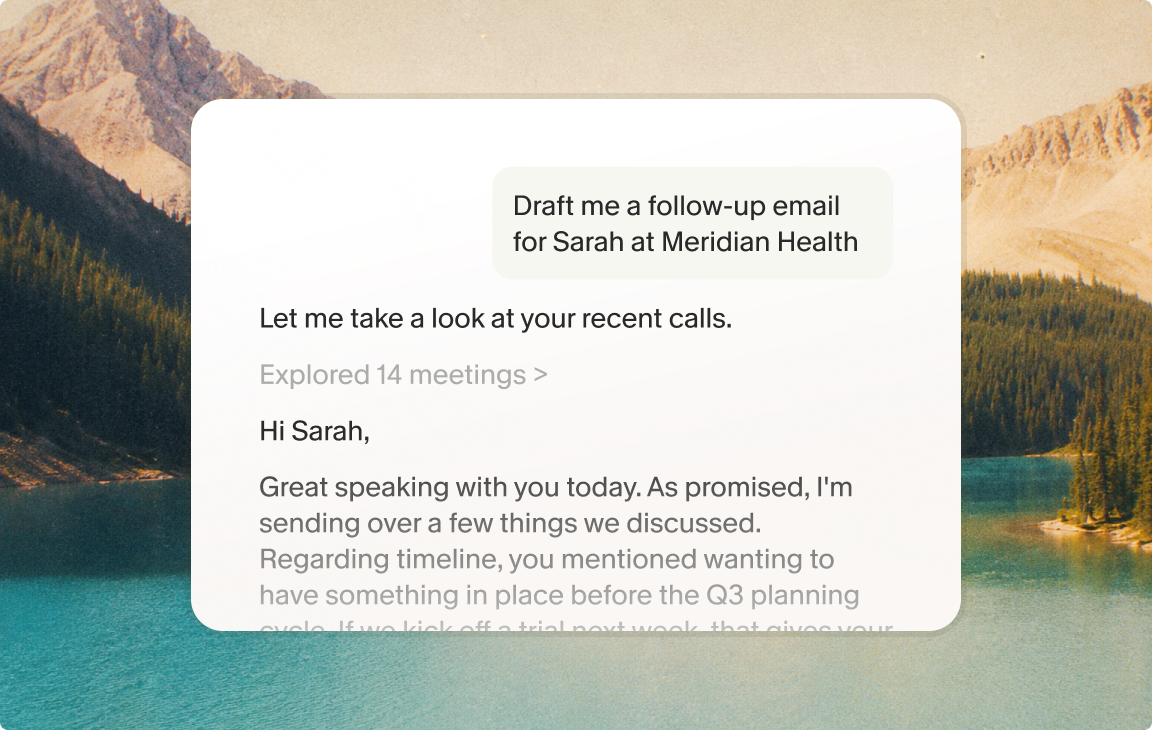
With your enhanced notes complete, ask Granola to draft your follow-up email. The AI pulls specific quotes and commitments from the transcript. Instead of generic "It was great speaking with you," your draft opens with "You mentioned your team struggles with CRM data accuracy because reps spend more time in meetings than updating records."
You can customize the tone to match how you write. The draft includes next steps agreed upon during the call, making it clear what both parties committed to.
Step 5: Review and send
Read through the draft to ensure it sounds like you. Add any personal touches or adjust phrasing. Granola's human-in-the-loop approach means you stay in control of what gets sent. The AI handles the administrative burden of reconstructing the conversation while you focus on strategy and relationship.
Copy the final email into your preferred tool or send notes straight to your CRM, project board, or Slack. Granola automatically matches your notes with the right people, company, or deal records in platforms like HubSpot, Attio, and Affinity.
"When I'm on a conference call, or even just a regular call, talking and taking notes at the same time is never easy. With Granola, it does the notetaking and thinks about how to assemble the, and when the calls over, I have the notes ready to refer to and share." - Andy A. on G2
What to look for in an AI notetaker for sales calls
Before comparing specific tools, weigh your sales call note-taking software against the criteria that actually affect deals:
- Bot-free capture: Does the tool join the call as a participant, or transcribe device audio from your own machine? Either way, tell participants you are using an AI notetaker at the start of the call.
- Verbatim accuracy: The follow-up is only as specific as the transcript, so look for accurate quotes, not just a rough gist.
- Follow-up drafting: A real sales call note-taking solution drafts the email for you, it does not stop at a summary.
- CRM sync: Notes should reach HubSpot, Salesforce, or your CRM without manual copy-paste.
- Speed: You want enhanced notes and a draft within seconds of hanging up, while the conversation is still fresh.
Comparing AI notetakers for sales workflows
Not all AI notetakers serve the same use case. The right choice depends on whether you prioritize individual rep productivity, team-wide analytics, or the lowest possible cost. Three categories of sales call note-taking software dominate the market, and each fits a different buyer.
Sales intelligence platforms analyze talk patterns, topics, objections, and sentiment with scorecards and coaching cues to improve rep performance. They include deep analytics and extensive call libraries used by large sales organizations for competitive insights and deal tracking at scale. The trade-off is cost. Seat-based pricing scales quickly as teams grow.
AI notepads like Granola focus on individual rep productivity rather than team-wide analytics. Granola runs on your laptop or phone and uses your device's audio to generate notes, so it works the same way across any meeting platform.
Basic transcription tools sit at the entry level. They turn audio into a raw transcript but stop there, leaving you to find the quotes, structure the summary, and write the follow-up yourself. They are cheap, but for an ai sales notetaker that actually drafts the email, you want capture, structuring, and drafting in one place.
Sharing sales insights with product and success teams
Sales calls contain intelligence beyond deal-closing. Prospects describe feature requests, compare you to competitors, and explain why previous solutions failed. Product teams need this feedback to build what customers actually want. Customer Success teams need to know what was promised during the sale.
Sharing your notes is simple with Granola. Once your meeting ends, you can instantly share your AI-enhanced notes on platforms like Slack or via email. Instead of asking Product to listen to a full hour-long call, share a summary about a feature request with proper context.
This turns sales reps into strategic partners. When you surface patterns across multiple discovery calls, Product can prioritize roadmap items based on real customer demand instead of guesses.
Ready to stop losing deals to slow follow-ups?
Download Granola, connect your calendar, and run your next discovery call. See how accurate notes and automated follow-up drafting help you close more deals without the administrative burden.
FAQs
What is the best AI notetaker for sales calls?
The best AI notetaker for sales calls is the one that turns the conversation into a follow-up you can send, not just a transcript. That means accurate verbatim quotes for personalization and a draft step that writes the follow-up email for you. Granola does both, which is why it fits reps who run back-to-back discovery calls — and whichever tool you use, tell prospects at the start of the call that you're using an AI notetaker.
Can an AI notetaker draft follow-up emails from a sales call automatically?
Yes. An AI notetaker that captures the full transcript can draft a follow-up email using the prospect's exact language, including the pain points, objections, and next steps agreed on the call. With Granola you jot key moments during the call, click Enhance notes, then ask it to draft the follow-up, and you review and send. The specificity comes from accurate transcription, not from a generic template.
Does the prospect know I'm using an AI notetaker?
With Granola, there's no visible bot, but you should let everyone know at the start of the meeting that you're using an AI assistant to take notes, regardless of your state's recording laws, by using our Automatic chat message or Video watermark features
Can I integrate this with Salesforce or HubSpot?
Granola automatically matches notes with the right deal records in HubSpot, Attio, and Affinity. Salesforce integration works through Zapier.
How long does it take to set up?
Download the app, connect your calendar, and start your next meeting. Setup takes under 5 minutes with no training required.
What if I call prospects in two-party consent states?
When calling someone in a different state, you must follow the stricter of the two states' laws. Always disclose at the start of each call.
Is my sales data used to train AI models?
Third-party AI providers used by Granola are contractually prohibited from training on your data. Enterprise customers are opted out of all model training by default, and all users can opt out in their settings.
Key terminology
AI sales notetaker: Software that automatically transcribes and summarizes sales calls using speech recognition and natural language processing to extract key insights like objections, buying signals, and action items.
Conversation intelligence: Technology that captures, transcribes, and analyzes business conversations using AI to improve communication strategies and sales outcomes.
Buying signals: Indicators that reveal a potential customer's readiness to make a purchase, such as asking about pricing, requesting demos, or mentioning decision timelines.
Bot-free capture: Recording method that captures device audio directly from the user's own device rather than joining the meeting as a participant.