





AI notetaker for sales teams: No more manual CRM entry
February 12
TL;DR: Sales reps can lose up to 10 hours weekly on manual CRM updates, taking important time away from selling. AI notetakers capture customer context during discovery calls and sync structured data to your CRM automatically. Your critical choice isn't whether to automate, but how. With Granola, you can jot rough notes, enhance them using AI, and push them directly to your CRM to save the post-call admin headache.
Most sales teams spend more time documenting conversations and post-call admin than is necessary. The actual notes get done, but the context that really matters such as a client's concerns about project timelines, a stakeholder's insights on team priorities, often gets simplified or lost in the process.
Research shows many sales reps spend over an hour daily on manual data entry, with high-activity teams logging up to 10 hours per week on call documentation. That's significant time that could be spent selling.
What matters most isn't just saving time on data entry, It's preserving the context that helps you close deals. AI notetakers (or AI notepads as we like to call Granola) capture what customers actually say and structure it for your CRM automatically. The key is choosing tools that help without disrupting your sales conversations.
This guide covers what an AI notetaker for sales teams does, the features that matter most, and how Granola keeps pipeline data accurate without manual CRM entry. For the individual-rep angle on turning a single call into a follow-up email, see our guide to the AI notetaker for sales calls.
What is an AI notetaker for sales?
An AI notetaker transcribes customer conversations in real-time, extracts structured data like objections and next steps, and syncs this information directly to your CRM. Five core functions distinguish these tools from simple transcription software:
- Real-time transcription converting speech to text during calls
- Speaker identification (diarization) labeling who said what
- AI-powered summarization surfacing key moments without replaying hour-long recordings
- Structured data extraction pulling action items and insights into discrete fields
- Direct CRM integration populating HubSpot or Salesforce without manual copying
The category offers two architectural approaches: some tools join the meeting as a participant, while device audio tools like Granola run on your laptop or phone and use your device's audio to generate notes. That combination of capture plus CRM sync is what turns basic transcription software for sales teams into a system that keeps your pipeline current.
Core benefits of AI notepads for sales teams
These tools convert conversation into pipeline data at the moment it happens:
1. Recovering selling time: When you eliminate 5-10 hours of weekly typing per rep, that time flows back into prospecting and deal progression. A team of 10 reps recovers 50-100 hours weekly, equivalent to adding two full-time sellers without increasing headcount. The time savings compound because manual entry creates downstream work. Reps forget to log calls, managers chase updates, forecasts require correction meetings. AI tools transcribe and summarize in real-time, letting you focus on the conversation with confidence that important points are being captured.
"allows me to focus on the conversation with confidence, that the important points are being noted." - Tom S. on G2
2. Pipeline truth: Manual updates capture what we remember in the moment, filtered through post-conversation interpretation. Automated capture creates a source of truth tied to actual conversation data. When questions arise about why a deal progressed or stalled, you can query the transcript for the exact objection rather than relying on reconstructed memory. The gap between "we discussed pricing" and "a decision-maker said our enterprise tier is 23% higher than the incumbent and needs board approval" determines whether your forecast holds.
3. Deal continuity: People transition roles constantly, promotions, internal moves, team reorganizations, departures. Each transition means months of relationship context and conversation history that risks disappearing. AI notepads create institutional memory that survives any transition. Anyone picking up an account can search "What were the main concerns from the January executive briefing?" and get citations from specific conversations rather than starting from zero.
Key features to evaluate in sales AI tools
You need to understand four critical capabilities when comparing tools:
- CRM integration depth (two-way sync vs one-way dump)
- Transcription accuracy for your technical vocabulary
- Capture method (how the tool gets meeting audio)
- Security credentials that match your compliance requirements
CRM integration depth
The difference between one-way dump and two-way sync determines whether the tool fits your workflow. Basic integrations push meeting summaries into a note field. Advanced integrations map specific data points to custom fields that drive your pipeline reports and forecasting models.
When evaluating tools, test whether they can populate the exact fields your sales process depends on. Can the AI extract MEDDIC qualification criteria and route them to your custom HubSpot properties? Does it create tasks in Salesforce automatically when a prospect requests a follow-up demo?
Granola was created to integrate with HubSpot, Affinity, and Attio for direct CRM sync, plus Zapier for connecting to thousands of applications including Salesforce. This hybrid approach gives you native integrations for common platforms and flexibility for custom workflows.
Transcription accuracy for technical sales
Generic transcription models struggle with industry jargon, product names, and technical terminology that matters in B2B sales. Transcription accuracy varies significantly and improves when you can train the system on your vocabulary. Even high accuracy rates become problematic when errors include your product name, the competitor you're displacing, or the specific compliance framework the buyer needs.
Test tools with actual sales transcripts that include your terminology. Can it distinguish between "ServiceNow" and "service now"? Does it recognize your product tiers correctly? AI tools that struggle with jargon lead to incomplete notes requiring manual correction, defeating the time-saving purpose.
How AI notetakers capture meeting audio
Importantly, not having a bot doesn't mean avoiding transparency. Granola strongly encourages users to let everyone know when transcription is taking place and to follow their organization's policies and any applicable consent requirements. To make this easy, Granola can automatically post a consent message in the meeting chat when transcription begins and display a persistent watermark on your video while transcription is active.
The architectural choice matters most in these scenarios:
- Enterprise C-suite deals: high-value conversations where accurate recall of what each stakeholder said matters
- Competitive situations: deals where the precise wording of an objection determines your next move
- Regulated industries: Healthcare, financial services, legal with heightened privacy concerns
- Reference calls: conversations where you need an accurate record of detailed feedback
"the AI is ACCURATE." - Verified user on G2
Security credentials and compliance requirements
Enterprise sales require vendors to meet specific security standards. SOC 2 Type II compliance certifies that a tool follows industry-standard controls for security, availability, and confidentiality. GDPR compliance matters when selling to European customers. HIPAA compliance becomes necessary in healthcare sales where patient information might be discussed. We (Granola) completed SOC 2 Type 2 certification in July 2025 and maintain GDPR compliance with transcripts encrypted at rest.
Beyond certifications, understand data retention policies. Enterprise plans typically offer model training opt-out to prevent your customer conversations from training third-party AI providers. Granola's Enterprise plan includes model training opt-out by default for the entire organization.
Sales use cases beyond basic call recording
Pipeline reviews that surface patterns
Traditional pipeline reviews rely on reps summarizing deal status from memory. AI-powered repositories let managers query across all deals simultaneously with questions like "Why are enterprise prospects stalling at the security review stage?" The system searches every customer conversation, identifies patterns in objections or timeline concerns, and returns citations from specific calls.
This capability transforms pipeline inspection from rep-reported summaries to evidence-based pattern detection. When three enterprise deals mention concerns about your data residency options, that's a product gap requiring immediate attention. When prospects in a specific vertical repeatedly ask about integration with a tool you don't support, that's roadmap input backed by customer voice.
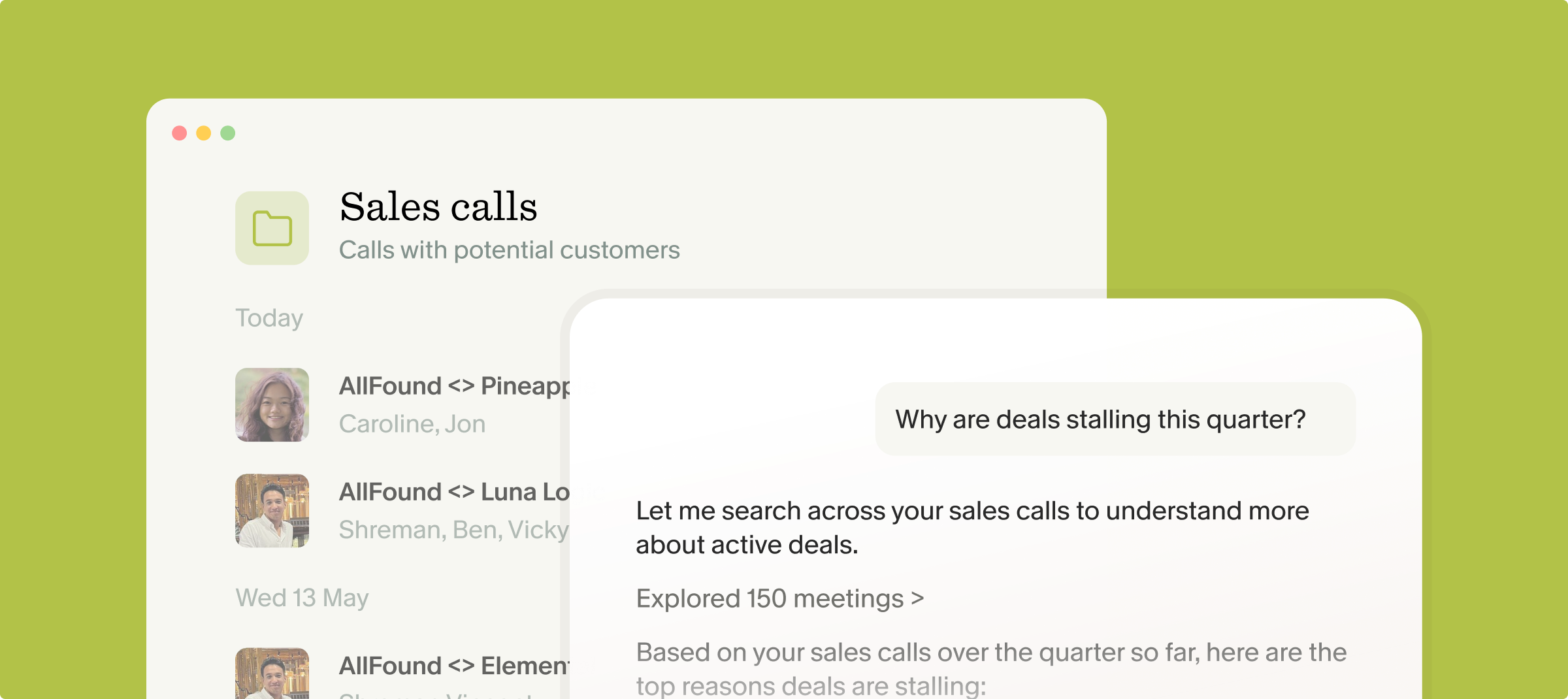
Granola's folder-level queries enable this workflow. Create a shared folder called "Enterprise Pipeline" and grant access to your sales leaders. Everyone sees all meetings in that collection and can ask questions across the entire dataset, routing product feedback to your product team when needed.
Forecasting grounded in real conversation data
Forecasts break when they run on rep sentiment instead of what buyers actually said. When every call syncs structured notes to the CRM, your forecast reflects real signals: The exact objection raised, the stakeholder who still needs to approve, the timeline the buyer committed to. Managers can query a pipeline folder with "which deals slipped their close date and why?" and get cited answers from the calls themselves, rather than chasing reps for updates before a forecast meeting. That is the difference between a dashboard that updates from conversation data and one that updates from memory.
Coaching sessions grounded in actual calls
Sales coaching typically happens through role-play scenarios or manager observation. AI transcripts let you coach based on what reps actually say during customer calls. Did they qualify budget using MEDDIC criteria? Did they handle the pricing objection with the value framework you taught? Did they ask for the meeting before ending the call?
Instead of "I think you should be stronger on discovery questions," you can reference the exact moment in Tuesday's call where the buyer signaled budget authority and the rep moved on without probing. Specificity makes feedback actionable because the rep can hear their own words and understand precisely what to change.
Conversation intelligence platforms excel at sales coaching metrics including talk ratios, sentiment tracking, and competitive mention analysis. Granola focuses more narrowly on documentation and retrieval, making it better suited for teams who need accurate notes with optional coaching rather than dedicated performance analytics.
Key considerations when evaluating AI notetakers for sales
How to choose the right tool for your sales team
1. How do you want meeting audio captured?
2. What's your CRM integration requirement?
If your sales process depends on custom objects or properties that drive pipeline reporting, verify the tool can populate these fields automatically. Generic notes dumped into a text field don't replace structured data entry.
3. Do you need conversation analytics or documentation?
Some platforms analyze talk ratios, track competitive mentions, and identify coaching moments through sentiment analysis. Others focus on accurate transcription and workflow automation. Choose conversation intelligence platforms if your team needs deal coaching dashboards. Choose documentation tools if your team needs to stop spending significant time on CRM updates.
4. What's the total cost across your team?
Calculate annual cost per team member including the platform fees. Higher-priced enterprise solutions make sense for larger teams with dedicated operations support but can overwhelm smaller organizations. Mid-tier options fit teams who need CRM hygiene without analytics overhead. Evaluate total cost against the specific capabilities your team actually requires.
How Granola keeps CRM data current
Granola is built around the idea that AI should enhance your judgment, not replace it. You jot what matters during the call and Granola fills in supporting context from the transcript afterward.
The AI notepad workflow
1. Automatic meeting detection: Before scheduled meetings, Granola sends a notification that lets you launch both your video call and start transcription with a single click. The tool monitors your calendar through Google or Microsoft account integration and prompts you at the right moment.
2. Write rough notes during the call: Open the notepad and jot bullet points as the conversation happens. Write "Pricing concern, implementation timeline" or just type the prospect's name when they raise an objection you want to remember. Granola runs on your laptop or phone and uses your device's audio to generate notes, and we recommend telling participants you are transcribing the call. The value comes from guiding the AI with your notes to signal what matters.
3. Enhance notes after the call ends: When the meeting wraps, Granola transforms your bullet points into structured documentation with context from the transcript. Your rough notes and AI additions are visually distinguished so you can see your input alongside automated enhancement.
"It listens directly from my device audio, no bots joining calls, and produces clean, structured summaries with decisions, action items, and key points." - Brahmatheja Reddy M. on G2
4. Sync to your CRM: Our HubSpot integration lets you share notes directly by clicking the HubSpot option and selecting which contact to associate with. You can also route enhanced notes through Zapier to populate custom Salesforce fields. Configure the workflow once and it runs automatically for every call.
Customization through templates and Recipes
Granola includes templates for different meeting types including sales calls, discovery sessions, demo calls, and pipeline reviews. Each template structures notes differently based on what matters for that conversation type.
Templates can be fully customized to match your sales methodology. If you use MEDDIC qualification, create a template that automatically extracts:
- Metrics the prospect cares about
- Economic Buyer who controls budget
- Decision Criteria they're evaluating
- Decision Process and timeline
- Identify Pain points discussed
- Champion who advocates internally
"Recipes" extend this further with saved prompts that process meeting content in specific ways. A "Feature Requests" recipe might scan customer calls for product gaps and compile them into a formatted document. A "Deal Risk" recipe could analyze stakeholder sentiment and flag deals showing stall signals.
Team collaboration through shared folders
On Business plans and above, create shared team folders like "Enterprise Deals" or "Q1 Prospect Calls." Everyone with folder access sees all meetings in that collection. When one team member hands off a qualified lead to another, they can open the folder, review the discovery call transcript, and understand the prospect's pain points before the first meeting. For a full team deployment walkthrough, from security validation to shared-folder structure, see the Granola integration checklist.
Chat with folders queries across all meetings simultaneously. Ask "Why are deals being lost this quarter?" and Granola searches every sales call, finds patterns in objections or competitive displacement, and cites specific conversations.
Privacy architecture that deletes audio
Granola transcribes audio in real time, then deletes it. No permanent audio recordings are stored. This architectural choice trades audio playback for privacy, which matters in sales conversations where retaining call recordings creates compliance risk.
Our contracts with third-party AI providers prohibit them from training on your data. You can opt out of our own anonymized training in Settings on any plan, and Enterprise plans opt the entire organization out by default, so customer conversations never feed a third-party model.
Third-party AI providers process data according to their respective enterprise agreements. Organizations concerned about model training should review provider terms and available opt-out options, which may vary by plan tier.
Ready to recover 5-10 hours of selling time per rep? Download Granolafor Mac, Windows, or iOS and connect your calendar. Run your next discovery call, enhance your notes, and sync to HubSpot without typing a single CRM field manually. See how quickly rough notes become CRM-ready documentation.
FAQs
What is the best AI notetaker for a sales team?
The best AI notetaker for a sales team is the one that keeps the CRM current without adding rep admin: it captures each call, extracts the objections and next steps, and syncs structured notes to your CRM automatically. For teams selling into enterprise or regulated buyers, accurate recall of exactly what each stakeholder said matters most. Granola combines device-audio capture, human-guided notes, and native HubSpot, Affinity, and Attio sync (plus Salesforce via Zapier), which fits teams that want CRM hygiene without a heavy analytics platform.
How does an AI notetaker keep CRM data accurate?
An AI notetaker keeps CRM data accurate by capturing what was actually said on the call and syncing structured fields, deal notes, objections, and next steps, straight into the CRM, instead of relying on a rep to retype it hours later. Because the record is tied to the transcript, forecasts and pipeline reports reflect real conversation data rather than reconstructed memory. With Granola you jot key moments live, enhance the notes after the call, and push them to HubSpot or, through Zapier, to Salesforce.
How accurate are AI notes for technical sales conversations?
Transcription accuracy is strongest in clean audio environments and improves when you customize vocabularies with industry terminology, product names, and technical jargon specific to your sales process.
Can AI notepads populate custom Salesforce fields automatically?
Yes. Zapier can map data to custom fields in both Salesforce and HubSpot when properly configured, though some limitations exist around special field types or very large custom objects.
How long does Granola setup take for a 10-person sales team?
Individual setup is quick per rep: download desktop app, connect calendar, run first meeting. Team deployment with HubSpot integration and shared folders typically completes in one week including Zapier workflow configuration.
What happens to audio after the call?
Granola transcribes audio in real-time, processes the text, then deletes the audio file automatically. No recordings stored anywhere. You get transcript-based documentation without audio retention requirements.
Key terminology
Transcription: Converting speech from captured audio or live conversations into written text format. Real-time transcription happens during the call while batch transcription processes captured audio afterward.
Diarization: Speaker identification technology that labels different speakers in meeting transcripts. Critical for multi-party sales calls where distinguishing between your champion, economic buyer, and technical evaluator matters.
CRM sync: Automated data transfer between AI notepad and customer relationship management platforms. Two-way sync updates both systems while one-way sync pushes data in a single direction only.
Device audio capture: Capture technology that accesses computer microphone and speaker audio directly without joining the meeting as a visible participant, contrasted with bot-based approaches that join as named attendees.
Field mapping: Configuration process that routes specific data points from meeting transcripts to corresponding CRM fields, ensuring deal stage, next steps, and objections populate the exact properties your reporting dashboards depend on.
Model training opt-out: Enterprise privacy control preventing third-party AI providers from using your customer conversation data to improve their language models. Keeps competitive insights and customer details confidential rather than feeding them into public AI training data.